
SharePoint

Modernization Built for Automotive Engineering, Quality, and Operations

Automotive manufacturers, suppliers, and dealer networks manage engineering drawings, vehicle specifications, supplier documentation, and quality records across a mix of legacy SharePoint sites, Teams, shared drives, and email. We work with automotive and mobility organizations to modernize that environment in controlled phases, build a trusted source for the documents teams rely on daily, connect SharePoint to the ERP, CRM, and quality systems already in use, and put governance in place that keeps the environment secure and ready for AI-assisted search. The result is an environment engineering, quality, procurement, and dealer teams can actually depend on.

Schedule Your Audit

Expert guidance for your financial institution's ecosystem.

Secure & Confidential. Your information is protected under industry standard protocols.

See how we’ve supported Isuzu Motors’ SharePoint environment for over 20 years
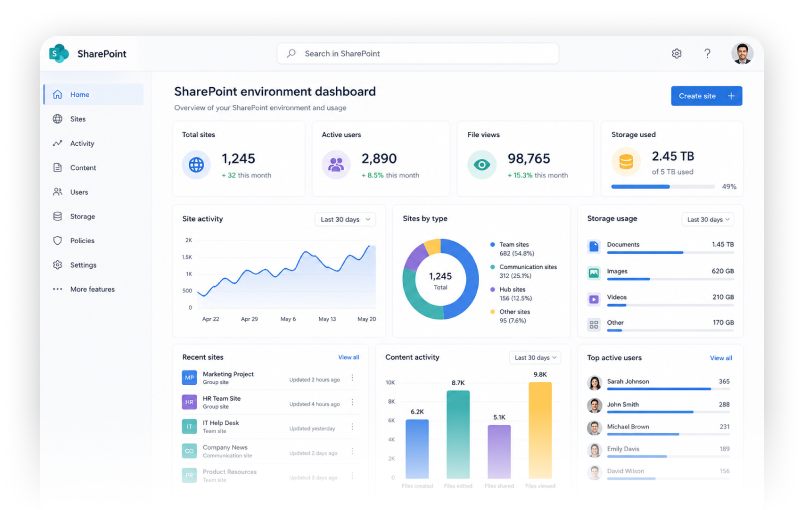
dashbord image
migrate and mordnize

Migrate and modernize without disrupting engineering, production, or dealer operations

migrate and mordnize

Migrate and modernize without disrupting engineering, production, or dealer operations

migrate and mordnize

Migrate and modernize without disrupting engineering, production, or dealer operations

Why Automotive SharePoint Environments
Become Difficult to Manage

 Automotive organizations generate an enormous amount of technical and operational content, and SharePoint environments often grow faster than the structure around them. A few patterns show up again and again. 

Engineering Drawings

Multiple versions of the same drawing circulate across sites and email, making it hard to confirm which one reflects the current design. 

Vehicle Specifications

Specifications for different platforms, trims, or model years get scattered across folders and sites, complicating cross-team reference. 

Supplier Documentation

Supplier certifications, quality agreements, and onboarding paperwork end up in inconsistent locations with unclear ownership. 

Standard Operating Procedures

SOPs are revised locally without a consistent review or publishing process, so floor staff may end up referencing an outdated version. 

Quality Records

Inspection results and quality records are split across systems, making it harder to assemble a complete record when one is needed. 

Internal and Dealer Communications

Policy updates and dealer communications move through email and Teams without a lasting, searchable record. 

How Fragmented Information Affects Automotive Operations

The operational cost of a disorganized SharePoint environment shows up differently across the organization. Careful language matters here, since the effect depends on how far a given environment has drifted.

Operational Area
Common SharePoint Issue
Potential Impact
Engineering
Multiple versions of drawings and specifications in circulation, with no clear indicator of the current release
Teams may reference outdated designs, which can slow reviews and introduce rework
Quality
Inspection records and audit evidence spread across sites with inconsistent metadata
Assembling a complete quality record for an audit or customer request could take longer than it should
Procurement
Supplier documentation and approvals stored inconsistently across teams
Vendor qualification may take longer, and expired documentation could go unnoticed
Manufacturing
Standard operating procedures updated locally without a consistent publishing process
Floor staff could end up working from a procedure that is no longer current
Supply Chain
Supplier and logistics information disconnected from core planning systems
Visibility into supplier status and documentation may lag behind what teams need for decisions
Dealer Operations
Dealer communications and reference material spread across email, Teams, and older sites
Dealers may not have consistent, current access to the information they need
Information Security
Permissions granted years ago and never revisited as roles and programs changed
Access can drift out of alignment with who actually needs it, which may increase exposure
IT Administration
Site sprawl and unclear ownership across a growing number of SharePoint sites
Maintaining, securing, and supporting the environment can become more time-consuming over time

Plan SharePoint Migration
in Controlled Phases

A SharePoint migration should start with a clear picture of the current environment, not a fixed assumption about the destination. We begin every automotive migration engagement with a current-state assessment covering sites, content, applications, permissions, and metadata across SharePoint Online, on-premises, and hybrid environments.

Not every site or document needs to move as-is. Part of the assessment is deciding what should be migrated directly, consolidated with related content, restructured for better organization, archived, retired, or in some cases remediated or redeveloped before it makes the move.

A TYPICAL MIGRATION ENGAGEMENT INCLUDES:
green icon-2 orange-2
Site, content, application, permission, and metadata review
green icon-2 orange-2
Migration prioritization based on business impact and risk
green icon-2 orange-2
Site consolidation where fragmented content can be brought together
green icon-2 orange-2
A pilot migration with a defined group before full rollout
green icon-2 orange-2
Testing and validation at each phase
green icon-2 orange-2
User readiness support and post-migration stabilization

Our Migration Approach Follows Five Stages

  1. Assess the Current Environment

    Review sites, content, applications, permissions, and metadata across SharePoint Online, on-premises, and hybrid environments. 
  2. arrow white

    Prioritize and Plan

     Rank what to migrate first by business impact and risk, and decide what should be consolidated, restructured, archived, or retired. 
  3. arrow white

    Pilot the Migration

    Move a defined group of sites or users first to validate the approach before full rollout. 
  4. arrow white

    Test and Validate

    Confirm content, permissions, and functionality at each phase before moving forward. 
  5. arrow white

    Stabilize and Support.

    Support user readiness after go-live and remain available to resolve issues as they surface. 
No migration can guarantee zero downtime or eliminate risk entirely, but a phased approach with testing at each stage is what keeps that risk manageable.

Create a Trusted Source for Automotive Documents

 A well-organized SharePoint environment gives every automotive function a reliable place to find current, approved information. 

Engineering

Current drawings, specifications, and design documentation organized by program and easy to locate. 

Quality

Inspection records, audit evidence, and quality documentation are organized and retrievable when needed. 

Procurement

Supplier agreements, certifications, and sourcing documentation centralized and current. 

Operations

Standard operating procedures and plant documentation kept current and easy to reference.

Supply Chain

Logistics and supplier reference material organized alongside related planning information. 

Dealer Teams

Dealer communications and reference material in one searchable, current location. 

Human Resources

Policies, onboarding material, and internal documentation are organized and easy to find. 

Internal Communications

Company updates and announcements archived and searchable rather than lost in email.  

What This Typically Includes

What This Typically Includes
Information architecture organized around how automotive teams actually work
Metadata and taxonomy that make documents easier to classify and find
Search configured to return current, relevant results
Version control so teams can trust they are viewing the current document
Role-based permissions aligned to who actually needs access
Clear document ownership for every library and site
Approval workflows for documents that require sign-off
Defined review cycles so content does not go stale
Archiving for documents that are no longer active but still need to be retained
Document lifecycle management from creation through disposal
 Centralizing information does not mean opening it to everyone. Role-based access and defined ownership keep sensitive engineering, quality, and supplier information available to the right people only. 

Connect SharePoint with Automotive Business Systems

SharePoint works best as part of a connected environment rather than a standalone system.

Connected System
SharePoint Role
Example Automotive Workflow
Microsoft Teams
Extends SharePoint content into everyday collaboration spaces
Engineering teams discuss and review drawings without leaving their project channel
OneDrive
Syncs individual working files with governed SharePoint libraries
Engineers move drafts into the shared library once a design is ready for review
Outlook
Connects email-based requests to tracked SharePoint workflows
A supplier onboarding request submitted by email is routed into a tracked approval workflow
Power Automate
Automates approvals, notifications, and status updates
An engineering document approval routes to the right reviewers with status visible to all
Power Apps
Provides lightweight interfaces for structured SharePoint data
Quality inspectors log findings through a simple form that writes directly into SharePoint
ERP
Synchronizes SharePoint documentation with production and planning data
A manufacturing change request links supporting documentation to the relevant ERP change order
CRM
Connects dealer and customer-facing documentation to relationship data
Dealer communication materials stay aligned with the CRM records dealer teams already use
Quality Management Systems
Aligns SharePoint quality documentation with formal QMS records
Audit evidence stored in SharePoint supports formal quality reviews without duplicate entry
Supplier Systems
Links supplier-facing documentation to supplier record data
Supplier onboarding documentation stays connected to the supplier’s record as it moves through qualification

Not every possible connection is worth building. Before recommending an integration, we evaluate security, data ownership, dependencies between systems, implementation complexity, and the business value it actually delivers. 

Establish Governance for Security, Growth, and AI Readiness

Governance keeps a SharePoint environment secure and organized as it grows, and it becomes more important, not less, as automotive organizations begin exploring AI-assisted search and tools. 
right img

Automotive SharePoint Use Cases

A few examples of how these capabilities come together in day-to-day automotive work:

Engineering Drawing Management

Engineering teams need confidence that they are working from the current released drawing. Version control and defined ownership keep the active drawing visible and prior versions traceable. 

Vehicle Specification Management

 Specifications for different platforms and model years need to stay organized. Structured libraries with consistent metadata keep specifications easy to locate by program or model. 

Quality and Inspection Records

Quality teams need to produce inspection records and audit evidence quickly when asked. Organized libraries with consistent metadata make that evidence easier to locate and trust. 

Supplier Onboarding

Supplier qualification involves certifications, agreements, and documentation from multiple contacts. A structured workspace with approval workflows gives onboarding a visible status and a clear owner. 

SOP Management

Standard operating procedures need a consistent review and publishing process. A defined library with version control keeps the active SOP visible and limits outdated copies in circulation. 

Manufacturing Change Requests

Change requests require documentation, review, and sign-off before implementation. Workflows tied to supporting documentation give each request a visible status and an audit trail. 

Dealer Communication

Dealer networks need consistent, current reference material and updates. A dedicated space keeps dealer-facing content organized and searchable rather than scattered across email. 

Audit and Compliance Documentation

Audits require assembling evidence quickly and confidently. Organized content with clear ownership and version history reduces the time spent preparing for one. 

Begin with a SharePoint and AI-Readiness Assessment

 You may already know that your SharePoint environment needs attention without knowing exactly what kind of help would matter most. An assessment is designed to answer that question before any technical work begins. 

Review the Current Environment

We review your SharePoint version, deployment model, sites, content, and existing customizations.

Understand Business and Technical Requirements

We talk with engineering, quality, IT, and other stakeholders about how the environment actually gets used. 

Identify Risks, Gaps, and Dependencies

 This includes permissions, metadata, integrations, storage, and governance gaps. 

Prioritize Improvements

We rank potential improvements by business impact and risk. 

Develop a Phased Roadmap

The engagement ends with a practical roadmap sequenced around your priorities and timeline. 

WHAT WE MAY REVIEW:

  • Sites and content structure

  • Permissions and metadata
  • Customizations and workflows
  • Integrations with ERP, CRM, and other systems
  • Storage and external sharing
  • Governance practices
  • User adoption
  • AI readiness
An initial consultation is a conversation to understand your environment and determine reasonable next steps. It is not a substitute for a complete technical assessment, which is typically scoped once we understand what you are working with. 
Connect With a SharePoint Specialist

Move from Assessment to Adoption

Once priorities are clear, delivery moves through a consistent process that keeps engineering, quality, procurement, operations, and IT aligned at every stage.

Discovery

Confirm scope, stakeholders, and success criteria across the teams involved. 

Requirements

Document business and technical requirements from engineering, quality, procurement, and other stakeholders. 

Information Architecture

Design how content will be organized, classified, and found. 

Governance Planning

Define permissions, ownership, and lifecycle policies before technical work begins. 

Solution Design

Design the target architecture for migration, integration, or automation work. 

Migration, Integration, or Automation

Carry out the work in planned phases, starting with a pilot before full rollout. 

Testing and Deployment

Test and validate each phase, then deploy according to the plan. 

Training, Support, and Optimization

Support user adoption and remain available for ongoing optimization as needs change. 

Ways to Work With Us

Automotive organizations work with us in different ways, depending on internal capacity and the scope of the work.

Engagement Option
Best Suited For
What's Included
Next Step
SharePoint Consulting
Organizations wanting dedicated, ongoing SharePoint expertise alongside their internal team
Continuous support across online and on-premises environments, plus custom development and governance guidance
Book a SharePoint Assessment to define scope and cadence
Migration and Modernization Project
A defined initiative such as a platform migration or site consolidation
Expert-led migration delivered against a fixed scope, budget, and timeline, with a pilot before full rollout
Book a SharePoint Assessment to scope the project
Integration and Automation Project
Organizations wanting SharePoint connected to ERP, CRM, or quality systems
Workflow automation and system integrations evaluated for security, data ownership, and business value
Book a SharePoint Assessment to scope the integration
Managed SharePoint Support
Organizations wanting day-to-day ownership handled by a partner
Monitoring, user support, health checks, and routine updates, with ongoing oversight
Book a SharePoint Assessment to review your support needs

Frequently Asked Questions

What are SharePoint services for automotive manufacturers?
SharePoint services for automotive manufacturers centralize engineering drawings, specifications, SOPs, quality records, and supplier documents in governed libraries. Version control, metadata, permissions, and approval workflows help teams locate current information and reduce reliance on email and shared drives. 
How can automotive companies migrate SharePoint without disrupting production?
A phased migration begins with assessing sites, content, customizations, permissions, and dependencies. Automotive organizations can then prioritize critical engineering and production content, run a pilot, validate functionality, and move remaining workloads while limiting operational disruption. 
Can SharePoint integrate with automotive ERP, CRM, and quality systems?
SharePoint can connect with ERP, CRM, quality management, supplier, and Microsoft 365 systems through approved integrations and workflows. These connections help link documents to business records, reduce duplicate entry, and improve visibility across engineering, quality, procurement, and dealer operations. 
How can automotive manufacturers prepare SharePoint for Microsoft Copilot?
AI readiness means organizing content before deploying tools such as Microsoft Copilot. Automotive manufacturers need accurate permissions, consistent metadata, defined ownership, current documents, and controlled external sharing so AI-assisted search returns reliable information without exposing restricted content. 
How does SharePoint improve automotive supplier document management?
SharePoint supports supplier document management by centralizing certifications, agreements, onboarding files, quality records, and approvals. Role-based access, expiration reminders, workflow tracking, and document ownership help OEMs and suppliers maintain current records while limiting access to authorized users. 

Empowering HR teams with enterprise-grade psychometric intelligence and seamless assessment workflows.

 Book a SharePoint Consultation

© 2026 Calance