

27 Aug 2026
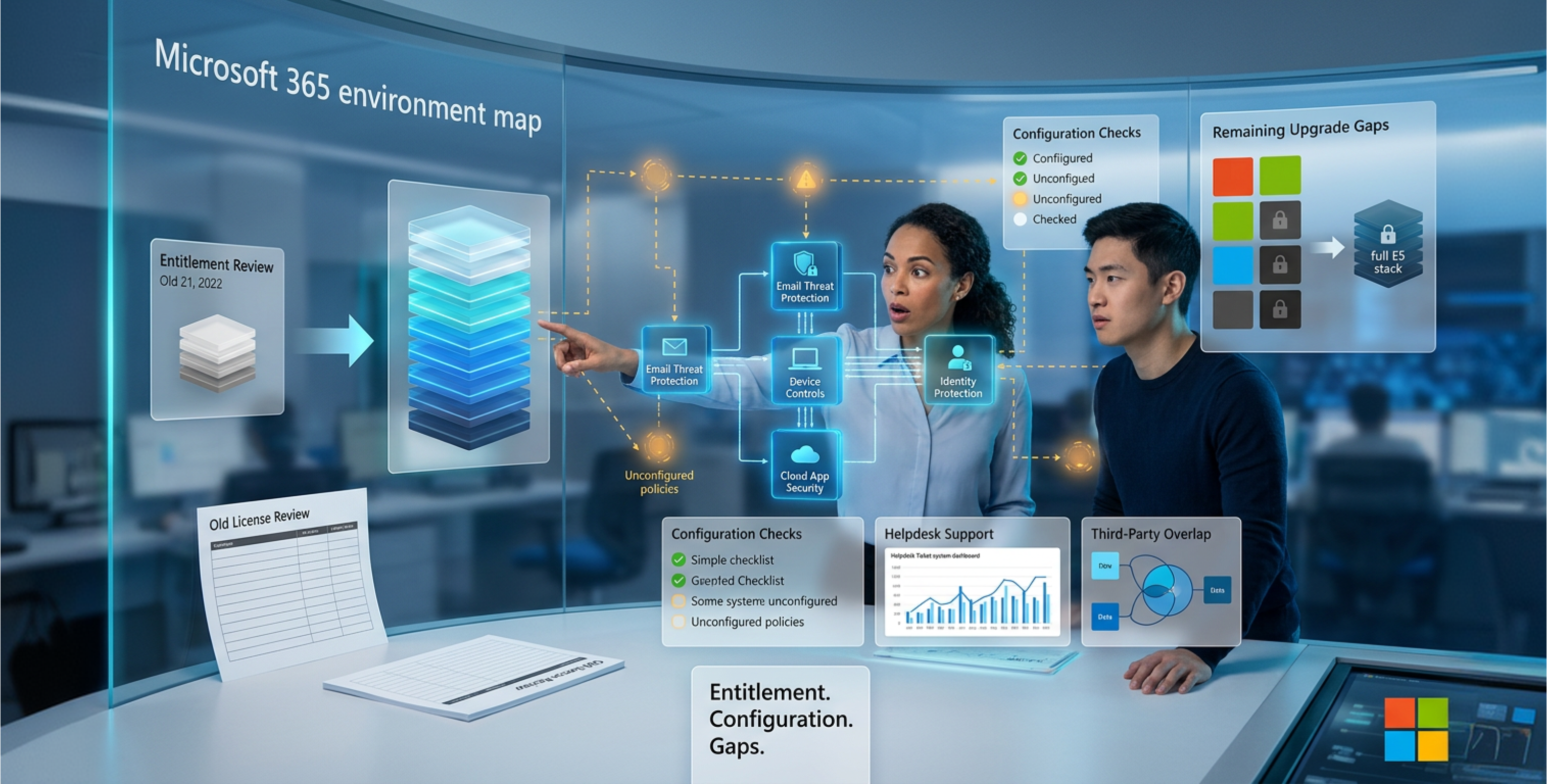
Microsoft changed what sits inside Microsoft 365 E3 on July 1, 2026. Defender for Office 365 Plan 1 became part of both Office 365 E3 and Microsoft 365 E3, and Intune Plan 2, Remote Help and Advanced Analytics arrived through Enterprise Mobility + Security E3. Microsoft began provisioning in June, set August 1 as the completion date, and posted a Message Center notice 30 days ahead of each tenant change. Most enterprise tenants now hold security capabilities their last license review never accounted for.
Those additions landed in environments that were not prepared for them. New email protection can switch on at a default level while the threat policies behind it stay untouched. Comparison charts written in 2024 or 2025 undercount the license, and plenty of IT teams still pay for third-party tools that overlap with something E3 gained in July. Microsoft 365 E3 security in August 2026 depends almost entirely on what administrators configured after the features arrived.
4 questions settle the answer for any given organization. What does the E3 entitlement cover today. What does each control protect once it has been configured and enforced. Which capabilities sit outside E3 at any configuration. And which of those gaps matter enough to justify additional spending. Calance works through a Microsoft 365 security baseline review in that order: entitlement first, configuration second, remaining capability gaps last.
Microsoft 365 E3 and Office 365 E3 Are Different Subscriptions
2 subscriptions share the E3 label and get treated as one product in most published comparisons. Office 365 E3 covers the productivity services.
Microsoft 365 E3 is Office 365 E3 combined with Enterprise Mobility + Security E3 and Windows 11 Enterprise E3, and those 2 additional components carry the majority of the Microsoft 365 E3 security features discussed on this page. The table below maps each layer to what it adds and why it matters.
|
Layer |
Office 365 E3 |
Added by Microsoft 365 E3 |
Security implication |
|---|---|---|---|
|
Productivity services |
Exchange, SharePoint, OneDrive, Teams, Office apps |
Same services, no change |
Exchange Online Protection and Defender for Office 365 Plan 1 apply here |
|
Identity |
Microsoft Entra ID Free tier only |
Microsoft Entra ID P1 through EMS E3 |
Conditional Access, MFA policy, self-service password reset, dynamic groups |
|
Device management |
Not included |
Microsoft Intune through EMS E3 |
Enrollment, compliance policy, configuration profiles, baseline deployment |
|
Operating system |
Not included |
Windows 11 Enterprise E3 |
Credential Guard, application control, Windows Autopatch, LAPS |
|
Endpoint protection |
Not included |
Defender for Endpoint Plan 1 via the suite |
Antivirus, attack surface reduction, device control, network protection |
|
Information protection |
Sensitivity labels, core DLP, Audit Standard |
Azure Information Protection rights through EMS E3 |
Label-based encryption applied on top of workload DLP policy |
An article evaluating Office 365 E3 will report that E3 has no device management and no endpoint protection, which is accurate for that subscription and wrong for Microsoft 365 E3. Open the Microsoft 365 admin center, go to Billing and then Your products, and confirm the exact subscription names before comparing anything. Everything below assumes Microsoft 365 E3.
What Changed Inside E3 During 2026
Microsoft announced the packaging change in December 2025 and set the effective date for July 1, 2026. 4 capabilities moved into the E3 tier and 3 closely related ones stayed above it, which makes the Microsoft 365 E3 security boundary easy to misread.
Defender for Office 365 Plan 1. Included with Office 365 E3 and Microsoft 365 E3 effective July 1, 2026, at Plan 1 capabilities only. Safe Links, Safe Attachments, anti-phishing with impersonation protection and real-time detections all come with it. Verify the service plan assignment per user, then review every anti-phishing and Safe Links policy in the tenant.
Intune Plan 2. Added to the Enterprise Mobility + Security E3 license, which sits inside Microsoft 365 E3. The Plan 2 capability set covers Microsoft Tunnel for mobile application management, firmware over the air updates for supported Zebra devices, and specialty device management for AR and VR headsets, smart screens and meeting room systems. Verify availability in the Intune admin center before planning any deployment.
Intune Remote Help. Included through the same EM+S E3 change, covering attended and unattended remote sessions with role-based access control and session auditing. Verify whether a standalone Remote Help add-on is still billing on the current invoice.
Intune Advanced Analytics. Included through the same change, extending Endpoint Analytics with device query, anomaly detection and deeper reporting on startup performance and application reliability. Verify which reports appeared in the Intune console rather than assuming the full set arrived.
Endpoint Privilege Management, Microsoft Cloud PKI and Enterprise Application Management. Not added to E3. These 3 attach to the full Microsoft 365 E5 subscription and remain available to E3 organizations only through a paid add-on. Verify the replacement entitlement is live in the tenant before cancelling any existing add-on, because dropping the wrong subscription early interrupts a service already in daily use.
Standalone EM+S E3 customers gained the same 3 additions, so the change reaches organizations that never bought the full suite. Any third-party contract covering email security, remote support tooling or endpoint analytics now overlaps with something included in the base license.
Where a License Stops and a Baseline Starts
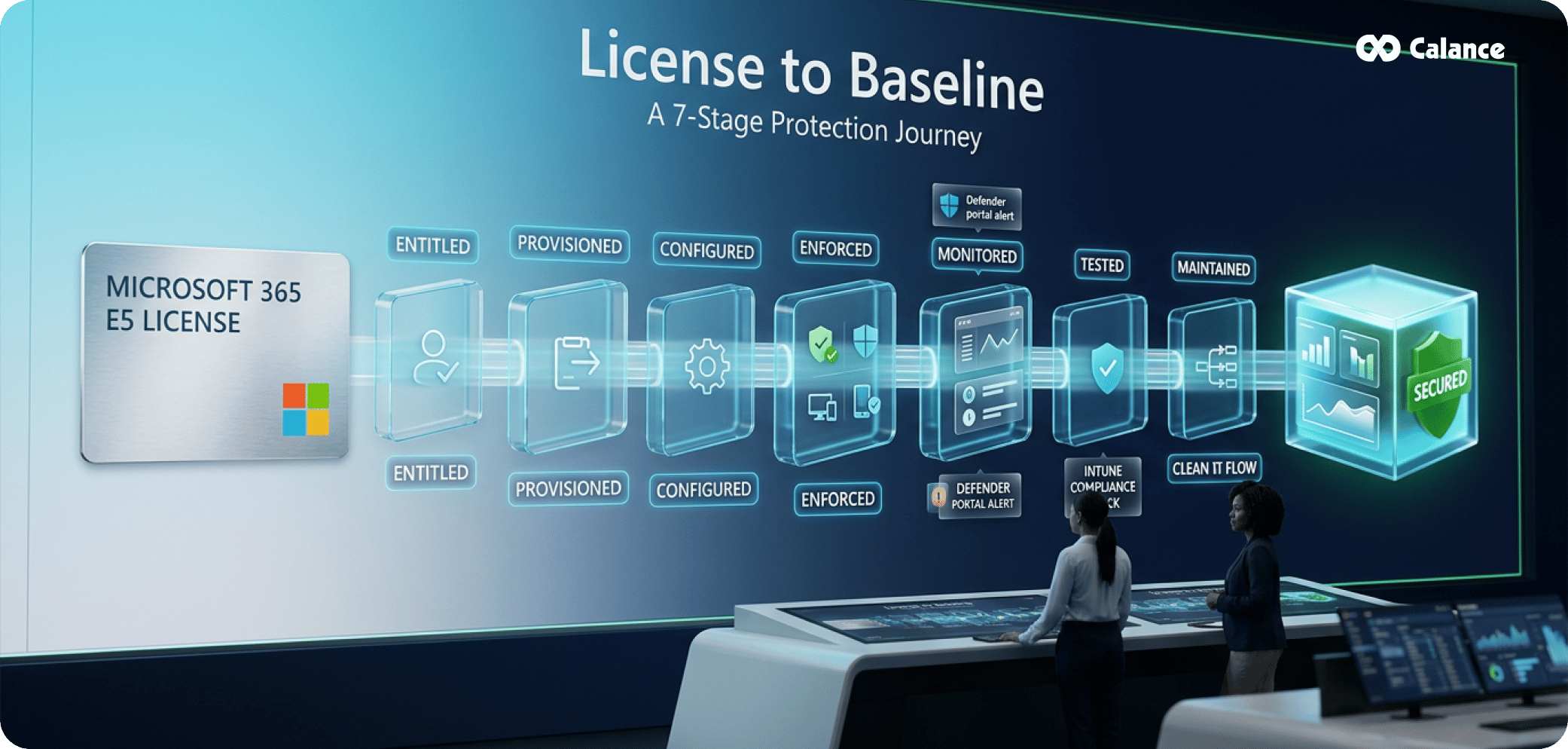
A license grants entitlement. Everything that produces actual protection happens in the 7 stages after that, and a tenant can stall at any one of them without anyone noticing.
Entitled. The subscription exists and carries the service plan. Nobody has listed which plans are active, so half the security conversation runs on assumption.
Provisioned. Microsoft has activated the service in the tenant. It reaches some users and skips others, usually contractors, shared mailboxes and service accounts.
Configured. An administrator has written policy. Common failure: Defender for Office 365 runs on Built-in Protection alone, which is minimal by design, with no preset or custom policy layered above it.
Enforced. The policy applies to real users and devices. A Conditional Access policy left in report-only mode for 8 months protects nobody in the organization.
Monitored. Somebody reads the output on a defined cadence. Alerts routed to a shared mailbox that nobody opens produce the same outcome as no alerts at all.
Tested. Somebody has proved the control fires. Nobody has confirmed that a non-compliant device gets blocked, or that the break-glass account still works when Conditional Access tightens.
Maintained. Exclusions accumulate. A DLP policy carrying dozens of exemptions added across 2 years no longer resembles the one that went through approval.
Microsoft's Intune security baselines make the distinction concrete, because they are preconfigured groups of recommended settings that an administrator deploys and manages. They exist in a tenant only once somebody assigns them to a device group, and the license has no bearing on whether that assignment happened. Most published Microsoft 365 security best practices describe the configuration stage and stop there, while the 4 stages after it decide whether a Microsoft 365 security baseline holds up against an actual attack. Calance scopes a security baseline configuration [-1] review around all 7 stages rather than the middle one.
Identity: How Far Entra ID P1 Takes You
Microsoft 365 E3 carries Microsoft Entra ID P1 through the EMS layer, and the Microsoft Entra service description sets out what that covers: Conditional Access, MFA enforcement through Conditional Access policy, self-service password reset with on-premises writeback, dynamic groups, group-based licensing, Application Proxy, custom banned password lists and role-assignable groups. For a cloud-first organization with disciplined administrative practice, that supports a working Zero Trust access model.
The line between P1 and P2 falls on 1 question: whether access decisions can react to risk. P1 evaluates conditions defined in advance. P2 evaluates what Microsoft's telemetry reports about the account at the moment of sign-in.
|
Security question |
Entra ID P1 in E3 |
Requires P2 or governance add-on |
Why it matters |
|---|---|---|---|
|
Is this user permitted to open this app |
Conditional Access by user, group, app, location |
Nothing further needed |
Core access control, fully available |
|
Did the sign-in complete MFA |
MFA enforced through Conditional Access |
Nothing further needed |
Phishing-resistant methods configurable |
|
Is the device compliant |
Grant control tied to Intune compliance |
Nothing further needed |
Depends on enrollment coverage |
|
Can the user reset their password |
Self-service password reset with writeback |
Nothing further needed |
Reduces helpdesk social engineering |
|
Is this sign-in anomalous |
No native risk signal |
Identity Protection sign-in risk |
Impossible travel and token anomalies |
|
Has this account been compromised |
No native risk signal |
Identity Protection user risk |
Leaked credentials and unusual behavior |
|
Should access tighten automatically |
Static conditions only |
Risk-based Conditional Access |
Step-up or block during an attack |
|
Should admin rights be permanent |
Standing role assignment |
Privileged Identity Management |
Time-bound activation with approval |
|
Who last reviewed this access |
Manual export and attestation |
Access reviews in Entra Governance |
Recertification evidence for auditors |
3 scenarios test the boundary in practice. A standard employee signing in from a managed laptop sits comfortably inside Microsoft 365 E3 security. An administrator holding a permanent Global Administrator assignment exposes the privileged access gap directly. A user whose credentials surfaced in a breach dump overnight is the case where Microsoft 365 E3 vs E5 produces a materially different outcome, because E3 receives no signal that anything about that account has changed.
Device Management After the July 2026 Intune Additions
The July 2026 change moved Microsoft 365 E3 2 rungs up the endpoint management stack, and the entitlement now covers everything from enrollment through analytics before it stops. Intune Plan 1 was already carrying the base of that stack long before 2026, so the practical story is what the Plan 2, Remote Help and Advanced Analytics additions attached on top and where the ceiling still sits. Reading the 8 layers downward shows exactly where the included capability ends and the paid tiers begin.
Enroll. Intune Plan 1 handles Windows, macOS, iOS and Android enrollment, plus co-management with Configuration Manager. Included in E3.
Configure. Configuration profiles, the settings catalog and security baseline profiles all deploy from Intune. Included in E3.
Comply. Compliance policies feed Conditional Access grant controls, so an unpatched or jailbroken device loses access to corporate data. Included in E3.
Support. Remote Help provides attended and unattended sessions with role-based access and full session auditing. New to E3 in July 2026.
Analyze. Advanced Analytics extends Endpoint Analytics with device query, anomaly detection and application reliability reporting. New to E3 in July 2026.
Connect. Microsoft Tunnel for mobile application management gives per-app VPN access without full enrollment, alongside firmware over the air and specialty device management. New to E3 through Intune Plan 2.
Elevate. Endpoint Privilege Management lets standard users run approved elevated tasks without holding local administrator rights. Above E3 at any configuration.
Certify. Microsoft Cloud PKI and Enterprise Application Management cover certificate lifecycle and enterprise app packaging. Above E3 at any configuration.
2 consequences follow from that boundary. Organizations that kept a separate Remote Help or Intune Plan 2 add-on through the change are now paying twice for endpoint management capability [-2] that the Microsoft 365 E3 security features list already covers, which is worth confirming against the invoice before the next true-up. And the elevation gap reshapes roadmaps, because a least-privilege program on Windows either buys Endpoint Privilege Management, buys a third-party privilege manager, or accepts standing local administrator rights on some population of machines.
Defender for Endpoint Plan 1: The Prevention Layer in E3
Microsoft 365 E3 includes Defender for Endpoint Plan 1, and the capability set runs well beyond the antivirus description that most comparison pages give it. Microsoft's Plan 1 overview groups the entitlement into next-generation protection, attack surface reduction, manual response actions and centralized management. Where Plan 1 stops is the investigation and automation layer that a security operations team works inside every day, so the practical read of the tier is strong prevention paired with limited detection and response depth.
2 boundaries decide how much of that prevention actually reaches an endpoint. Attack surface reduction is where most E3 tenants leave protection unused, and it is the gap that appears most often in a Microsoft 365 security baseline review, because the rules ship in a disabled state and moving them from audit to block requires an exclusion review that few teams put on a schedule. A tenant running ASR in audit mode for 18 months holds the control without applying any of it. Server coverage is the second boundary, since Microsoft's Plan 1 documentation licenses server protection separately from the user entitlement, so domain controllers, file servers and application servers need Defender for Servers or a dedicated server license rather than the user E3 seat that would otherwise leave the highest-value machines uninstrumented. The table below maps the tier against the 4 stages of an endpoint program, marking where the E3 entitlement holds and where Plan 2 becomes the requirement.
|
Stage |
Covered by Plan 1 in E3 |
Requires Plan 2 |
|---|---|---|
|
Prevent |
Defender Antivirus, behavior-based and real-time protection, cloud-delivered protection |
Nothing further at this stage |
|
Harden |
ASR rules, controlled folder access, network protection, device control, firewall |
Nothing further at this stage |
|
Filter |
Web threat protection and web content filtering across supported browsers |
Nothing further at this stage |
|
Restrict |
Application control for trusted code in the Windows kernel |
Nothing further at this stage |
|
Detect |
Malware alerts, alert queue and severity grouping in the Defender portal |
Endpoint detection and response sensor telemetry |
|
Investigate |
Alert detail review and manual triage from the portal |
Device timeline, advanced hunting, incident correlation |
|
Respond |
Run antivirus scan, isolate device, add file block or allow indicators |
Automated investigation, live response, remediation |
|
Reduce risk |
Security reports, APIs and role-based portal access |
Defender Vulnerability Management exposure scoring |
Email and Collaboration Security Under Defender for Office 365 Plan 1
Defender for Office 365 Plan 1 reached both Office 365 E3 and Microsoft 365 E3 on July 1, 2026, at Plan 1 capabilities only. This is the largest single addition to the Microsoft 365 E3 security features list in several years, and it arrived in most tenants without a deployment project behind it.
E3 email security before July 2026
• Exchange Online Protection covering anti-spam, anti-malware and connection filtering
• Spoof intelligence and signature-based anti-phishing
• Zero-hour auto purge for threats identified after delivery
• Anything beyond that required a paid add-on or an E5 upgrade
E3 email security from July 2026
• Safe Attachments detonating unknown attachments in an isolated environment before delivery
• Safe Links applying time-of-click URL verification, including links that were clean on arrival
• Safe Attachments extended to SharePoint, OneDrive and Teams content
• Anti-phishing with user impersonation, domain impersonation and mailbox intelligence
• Real-time detections reporting for post-delivery investigation
Capabilities that remain in Plan 2
• Threat Explorer and threat trackers for historical hunting
• Campaign views correlating related attacks across the tenant
• Automated investigation and response for email-triggered incidents
• Attack Simulation Training for phishing simulation programs
• Advanced hunting across email telemetry inside Defender XDR
3 reviews belong on the calendar now that provisioning has completed. Threat policies come first, because Built-in Protection leaves impersonation protection unconfigured and applies no preset. Mail flow comes second, since tenants routing inbound mail through a third-party gateway need Enhanced Filtering or Defender scores the wrong source address. User impact comes third, because Safe Links rewrites URLs and quarantine notifications change what people see. Calance opens a Microsoft 365 security assessment on those 3 reviews, since a tenant that skips them inherits defaults nobody chose.
SaaS Visibility and Hybrid Identity Coverage
2 security domains stay thin after every configuration improvement described so far, and both surface during an incident rather than during a licensing review.
SaaS control. Cloud App Discovery arrives with Entra ID P1, so E3 can ingest firewall and proxy logs and build a shadow IT inventory covering which cloud applications people use, from which devices, at what volume. Governing those applications is a separate product. Defender for Cloud Apps adds the control plane, and it attaches to EMS E5 or Microsoft 365 E5 rather than to E3:
• Cloud access security broker controls over sanctioned and unsanctioned apps
• SaaS security posture management across connected applications
• OAuth application governance and consent risk scoring
• Session policies that block download, restrict copy or apply labels at access time
• Threat protection and data scanning inside third-party SaaS platforms
Hybrid identity. Entra ID P1 secures the cloud directory and nothing below it. Defender for Identity monitors the on-premises side and requires EMS E5, Microsoft 365 E5 or a standalone license:
• Detection of DCSync, Kerberoasting, Golden Ticket and lateral movement activity
• Identity posture assessments across Active Directory and AD CS
• Attack path analysis from a standard account toward domain administrator
• Alerting on reconnaissance against domain controllers and service accounts
Hybrid identity is the sharper of the 2 gaps for most enterprises, because the Microsoft 365 E3 vs E5 comparison usually gets framed around cloud features while domain controllers, certificate services and Entra Connect servers keep running with no dedicated detection layer above the standard Windows event log.
Data Protection and Compliance With Core Purview
Describing Purview as an E5 product is one of the more common errors in circulation. Microsoft 365 E3 includes DLP for Exchange, SharePoint and OneDrive, Information Protection with manual sensitivity labels, retention policies with manual retention labels, Audit Standard, eDiscovery Standard and Compliance Manager. An organization that deploys those carefully has real data protection inside its Microsoft 365 security baseline.
The limits fall in 2 places: which workloads DLP can reach, and whether classification happens automatically or waits for a person to apply a label by hand.
|
Data surface |
Covered by E3 |
Advanced capability |
Licensing required |
|---|---|---|---|
|
|
DLP policy on Exchange Online, label-based encryption |
Advanced Message Encryption with revocation and expiry |
E5 or Purview add-on |
|
SharePoint |
DLP policy on sites and libraries, manual labels |
Automatic labeling across existing stored content |
E5 or Purview add-on |
|
OneDrive |
DLP policy on user content, manual labels |
Automatic labeling with broader policy scope |
E5 or Purview add-on |
|
Teams |
Sensitivity labels on teams, groups and files |
DLP policy on chat and channel messages |
E5 or Purview add-on |
|
Endpoints |
Device control through Defender for Endpoint |
Endpoint DLP over copy, print, upload and clipboard |
E5 or Purview add-on |
|
Insider activity |
No behavioral risk detection available |
Insider Risk Management and Communication Compliance |
E5 or Purview add-on |
|
Audit trail |
Audit Standard with 180-day retention and export |
Audit Premium with custom retention and higher bandwidth |
E5 or Purview add-on |
|
Legal hold |
eDiscovery Standard covering search, hold and export |
eDiscovery Premium with custodian management and review |
E5 subscription |
|
Records |
Retention policies and manual retention labels |
Records Management with disposition review |
E5 or Purview add-on |
The 180-day audit window deserves a documented decision. Breach discovery frequently happens months after initial compromise, and an investigation opened in month 8 finds the relevant sign-in and mailbox events already aged out of Audit Standard. That single row moves more Microsoft 365 E3 vs E5 conversations in regulated industries than any Defender feature, and it belongs in the same discussion as Copilot readiness and data governance, where manual labeling reaches its practical ceiling quickly.
Windows Hardening, Patching and Baseline Versions
Licensing settles what an organization may deploy. Windows configuration settles what an attacker actually encounters on a managed device. Intune security baselines give E3 tenants preconfigured recommended settings for Windows, Defender for Endpoint, Microsoft 365 Apps, Edge and Windows 365, every one of them deployable with licenses already held.
Version currency is the part that quietly decays. Windows 10 reached end of support on October 14, 2025, so an enterprise Microsoft 365 security baseline in 2026 targets Windows 11 with a documented exception list for machines still completing migration. The Windows MDM security baseline now carries a version 25H2 profile, and Microsoft added at least 1 setting to that profile in a June 2026 service update, which does not apply automatically to profiles created earlier.
1. Confirm the assigned Windows MDM baseline is the current 25H2 version, then edit and save any profile created before the June 2026 update so the added settings actually deploy
2. Deploy the current Microsoft 365 Apps for Enterprise baseline shown in the Intune console, covering macro handling, Protected View and legacy file format behavior
3. Apply the Defender for Endpoint baseline, then move attack surface reduction rules from audit to block after a documented exclusion review
4. Assign compliance policies covering encryption state, minimum OS build, firewall status and Defender health, then bind them to Conditional Access grant controls
5. Enable Windows Autopatch for Windows, Office, Edge and Teams update rings using the Windows Enterprise E3 rights already included in the suite
6. Verify BitLocker with key escrow to Microsoft Entra ID on every managed device, including devices enrolled before the escrow policy existed
7. Deploy Windows LAPS with the backup directory set to Microsoft Entra ID, then audit standing membership of the local administrators group
8. Schedule a quarterly drift review comparing deployed versions against current Microsoft publications, since Microsoft 365 security best practices lists rarely flag version decay
Monitoring the Controls You Configured
Every control described so far produces evidence.
The question worth asking at the end of a configuration project is who reads that evidence next Tuesday, and what happens when it reports something bad. The table below maps each control to what it produces and who owns the response.
|
Control |
Evidence produced |
Where it appears |
Response owner |
|---|---|---|---|
|
Conditional Access |
Sign-in logs, policy hits, report-only results |
Microsoft Entra admin center |
Identity or security lead |
|
Defender for Endpoint |
Malware alerts, ASR triggers, device health |
Microsoft Defender portal |
Endpoint team, escalating |
|
Defender for Office 365 |
Real-time detections, quarantine, user reports |
Microsoft Defender portal |
Messaging or security operations |
|
Intune compliance |
Non-compliant counts, policy drift, enrollment gaps |
Microsoft Intune admin center |
Endpoint team |
|
Purview DLP |
Policy matches, user overrides, false positive rate |
Microsoft Purview portal |
Data protection or compliance |
|
Audit log |
Admin activity, mailbox access, sharing events |
Purview audit search, 180 days |
Security, with legal on request |
|
Secure Score |
Improvement actions across identity, apps, data |
Microsoft Defender portal |
Security architect |
Microsoft Secure Score works best as a prioritization queue rather than a target, since Microsoft's own guidance weighs the score against usability and states that not every recommendation suits every environment, so an internal mandate to reach 100% produces controls that get exempted within a month. Select the actions that reduce genuine exposure in the organization's threat model, record the reasoning behind every declined recommendation, and keep that record where an auditor can find it. Policy drift review works on a quarterly cadence, and Calance treats that cadence as part of the Microsoft 365 security baseline rather than as reporting overhead, while detections need daily ownership, which is where published Microsoft 365 security best practices collide with staffing reality, because E3 generates alerts at 2am whether or not anybody is rostered to triage them, and managed detection and response covers the hours an internal team cannot.
The Capabilities That Stay Outside E3
Configuration closes most of the gap described so far. The capabilities below survive perfect configuration, because the Microsoft 365 E3 security features list does not contain them at any level of administrative effort.
Identity risk and privileged access. Entra ID P2 adds Identity Protection with user-risk and sign-in-risk detection, risk-based Conditional Access, Privileged Identity Management for time-bound role activation, and scheduled access reviews with reviewer workflow. Organizations with heavy credential-phishing exposure, more than a handful of Global Administrators, or an access recertification requirement under SOX, ISO 27001 or SOC 2 need it first.
Endpoint detection and response. Defender for Endpoint Plan 2 adds sensor telemetry, device timeline, advanced hunting, automated investigation and response, live response, and Defender Vulnerability Management exposure scoring. Teams operating a security operations function need it, and so does any organization without a third-party endpoint detection platform already deployed.
Hybrid identity detection. Defender for Identity adds attack-technique detection across Active Directory, AD CS and Entra Connect, covering activity that never touches the cloud directory. Organizations still running domain controllers need it regardless of how well the cloud tenant is configured.
SaaS security control. Defender for Cloud Apps adds cloud access security broker session controls, application governance, OAuth consent risk scoring, and SaaS posture management. Estates where business units buy their own software and connect it to Microsoft 365 data need it most sharply.
Email investigation and simulation. Defender for Office 365 Plan 2 adds Threat Explorer, campaign views, automated investigation and response, and Attack Simulation Training. Organizations running internal phishing simulation programs or conducting email-led investigations need it to do either properly.
Advanced data and compliance controls. Advanced Purview adds Endpoint DLP, Teams DLP, automatic labeling, Insider Risk Management, Communication Compliance, Records Management, and Audit Premium retention. Financial services, healthcare and IP-heavy manufacturing need several at once, and regulated retention schedules make Audit Premium a compliance requirement first.
Cross-domain correlation and AI governance. E5 and E7 add full Defender XDR correlation across identity, endpoint, email and SaaS, automatic attack disruption, and richer Copilot and agent governance controls. Organizations consolidating detection and response onto Microsoft, or planning identity and security architecture around autonomous agents rather than assisted Copilot use, need it directly.
None of the 7 items above closes through configuration. Each one requires a different license, add-on or product, which is why the next step is deciding which ones the organization actually needs rather than which ones it is missing.
Choosing Where the Next Security Dollar Goes
4 steps, worked in order. Skipping ahead to the fourth is how organizations buy capability they already own.
Step 1 asks whether E3 is being used. Inventory before purchase. Which users carry the Defender for Office 365 Plan 1 service plan, and which threat policies have moved past Built-in Protection. How many devices are Intune-enrolled against the total endpoint count. Whether ASR rules sit in block mode or audit mode. Whether Conditional Access still holds report-only policies from a project that ended last year. Whether any DLP policy exists beyond the default template. Whether the current Windows and Office baselines are actually assigned to device groups.
Step 2 asks what the organization cannot do. Write the gaps in operational language rather than product names. No signal when an account is compromised. No time-bound elevation for administrators. No visibility into domain controller attacks. No content controls when data moves to USB. No behavioral detection when somebody resigns and starts downloading. Written this way, the list stays short and stays honest.
Step 3 asks what already covers those gaps. Match each item against the platforms already deployed: endpoint detection and response, email gateway, identity and access management, privileged access management, cloud access security broker, data loss prevention, and any managed detection contract in force. An organization running a mature third-party endpoint platform has no Defender for Endpoint Plan 2 gap. A missing Microsoft feature counts as a security gap only where nothing else provides the control.
Step 4 selects the licensing and operating model. Realistic outcomes include staying on E3 and completing the configuration work, adding a targeted Defender, Purview or Entra add-on, applying role-based licensing verified against Microsoft Product Terms, moving to E5 where the gap list runs long, or moving to E7 where autonomous agent governance is genuinely in scope. Mixed licensing needs verification first, because tenant-level services generally require licenses for every user who benefits rather than for the administrators who operate them. Calance handles the first 3 steps as a Microsoft 365 licensing and security review [-3] covering service plan inventory, feature usage analysis, security configuration assessment against Microsoft 365 security best practices, and gap mapping that accounts for tools already in place.
Microsoft 365 E3 Security FAQs
What security features are included in Microsoft 365 E3 in 2026?
Microsoft Entra ID P1 with Conditional Access, Microsoft Intune including Plan 2 capabilities, Defender for Endpoint Plan 1, Defender for Office 365 Plan 1, core Purview covering DLP, Information Protection, Audit Standard and eDiscovery Standard, plus Windows 11 Enterprise E3 controls and Windows Autopatch.
Does Microsoft 365 E3 now include Defender for Office 365?
Plan 1 only, effective July 1, 2026. That covers Safe Links, Safe Attachments, anti-phishing with impersonation protection, and real-time detections. Microsoft provisioned tenants gradually with Message Center notice. Check assigned service plans, then review every threat policy.
Does Microsoft 365 E3 include Defender for Endpoint?
E3 includes Plan 1: next-generation protection, attack surface reduction, web protection, device control, application control and selected manual response actions. Plan 2 stays separate and adds endpoint detection and response, advanced hunting, automated investigation and vulnerability management.
Does Microsoft 365 E3 include Conditional Access?
Yes. Conditional Access comes with Microsoft Entra ID P1, part of Microsoft 365 E3 through EMS E3. Policy conditions evaluate user, group, application, location, platform and Intune device compliance. Risk-based conditions require Entra ID P2 instead.
Does Microsoft 365 E3 include Privileged Identity Management?
No. PIM requires Microsoft Entra ID P2. E3 supports least-privilege design through role-assignable groups and custom roles, but those assignments are standing rather than time-bound, with no native activation approval, expiry or activation alerting.
Does Microsoft 365 E3 include Intune Plan 2?
Yes, since July 2026. Plan 2 capabilities reached E3 through the EM+S E3 license, alongside Remote Help and Advanced Analytics. Endpoint Privilege Management, Microsoft Cloud PKI and Enterprise Application Management stayed with E5 or paid add-ons.
Is Microsoft 365 E3 enough for enterprise security?
It depends on 4 things: how well the included controls are configured, the organization's regulatory retention and investigation requirements, which third-party security platforms are already running, and whether anybody monitors detections daily. A well-configured Microsoft 365 security baseline on E3 outperforms a neglected E5 tenant.
What is the biggest security difference between Microsoft 365 E3 and E5?
E3 is strong at prevention: access control, endpoint hardening, email filtering and data loss prevention. The Microsoft 365 E3 vs E5 gap concentrates in detection and response, covering identity risk signals, endpoint telemetry, cross-domain correlation, automated remediation, insider risk and advanced compliance.
Should businesses upgrade from E3 to E5 for every user?
Rarely the right first move. Map the capability gaps that matter, check whether existing tools already cover them, then consider role-based licensing or targeted add-ons. Mixed licensing needs verification against Microsoft Product Terms, since tenant-level services usually require licenses for every protected user.
What should IT check first after the July 2026 changes reached the tenant?
Start with assigned service plans, then Defender for Office 365 threat policies and mail flow, then Intune for the new Plan 2, Remote Help and Advanced Analytics capabilities. Finish by reviewing any third-party contract that now duplicates an included capability.
Let’s Build Your Digital Future Together
Tell us about your business challenges — we’ll help craft the right solutions.
Book a Free Consultation →