

26 Aug 2026

Microsoft 365 Copilot does not create a new SharePoint permission model. It works against the content a user can already reach through Microsoft 365 and Microsoft Graph, then makes that content much easier to retrieve, summarize, compare, and reuse. That changes the practical consequence of old SharePoint decisions. A file that has been technically accessible to 2,000 employees for three years may have attracted little attention because nobody knew it existed. Once Copilot can find it from a natural-language prompt, the same permission becomes much more visible.
That is the technical reason a Copilot-Ready SharePoint environment has to be prepared before licenses are widely assigned. The work starts below the Copilot interface: site ownership, group membership, sharing links, inherited permissions, Everyone Except External Users access, guest access, stale content, sensitivity, retention, metadata, duplicate material, and the quality of the source that Copilot will ground against. If those layers are unclear, Copilot can make an existing content problem easier to discover at machine speed.
The objective is not to make SharePoint perfectly tidy before AI is enabled. The objective is to identify which content can safely become easier to discover, which sites need access remediation first, which material should be archived or removed, and which repositories need a temporary discovery restriction while owners review them. A practical SharePoint Copilot Readiness program treats permissions and content quality as two separate control tracks that meet at go-live.
TL;DR
Exposure: Copilot respects existing permissions, but better retrieval can expose the consequences of permissions that were always too broad. The main pre-launch risks are broad internal groups, stale guest access, Anyone links, broken inheritance, ownerless sites, and sensitive files stored where far more people can reach them than the business intends.
Readiness: Prepare SharePoint for Microsoft 365 Copilot by reviewing access and content separately. Access work answers who can reach a site, library, folder, or file. Content work answers whether what they can reach is current, authoritative, classified, retained correctly, and useful enough to ground an AI response.
Release rule: Do not make Copilot readiness a tenant-wide yes-or-no decision. Group sites by risk, remediate the highest-exposure locations first, use temporary discovery controls where needed, pilot with business owners who can validate results, and expand only when permission evidence and content ownership support the next cohort.
Copilot Changes Retrieval Pressure, Not Permission Law
SharePoint has always allowed administrators and owners to create broad access patterns. The difference with Copilot is that discovery becomes conversational. Users no longer need to know a site name, browse a library, remember a folder path, or search with the right keyword. They can ask a question and receive an answer grounded in content they are permitted to access.
Microsoft states that Copilot and agents retrieve data through Microsoft Graph and respect existing permissions, sharing settings, and policies. Its current guidance for preparing SharePoint also tells administrators to identify overshared content, inactive or ownerless sites, and other risks before broader AI use. The Microsoft SharePoint Copilot readiness guidance makes the core architecture point clear: AI readiness depends on the state of the content and access model that already exists.
This is why a normal SharePoint health check and a SharePoint Copilot Readiness review are related but not identical. A site can function correctly, pass a basic availability check, and still be a poor AI source because permissions have drifted or the library contains five versions of a policy with no authoritative copy. A SharePoint and Microsoft 365 integration plan becomes useful here because Teams, OneDrive, SharePoint, Entra groups, workflows, and search all influence where content lives and who can reach it.
Start With the Exposure Path, Not the Site Homepage
The most useful way to inspect Microsoft 365 Copilot SharePoint Permissions is to follow the path by which a user gains access. The visible site membership is only one part of that path.
|
Access path |
Why it matters before Copilot |
What to inspect |
Typical remediation |
|
Microsoft 365 or Entra group membership |
A large group can expose an entire site at once |
Group purpose, nested membership, inactive accounts, role fit |
Right-size membership and define owner review |
|
Everyone Except External Users |
Content becomes available to nearly every internal identity |
Sites, libraries, folders, or files using EEEU |
Replace broad grants with role-based groups where business need is narrower |
|
Anyone links |
Content can be reached without normal identity-based membership |
Link age, target content, expiry, download setting |
Remove or expire links that no longer have a business purpose |
|
Specific sharing links |
Access can persist after the original task ends |
Recipient list, external identities, link expiry |
Revoke stale shares and set review dates |
|
Broken inheritance |
A folder or file can have a different audience from its parent |
Unique permissions below site and library level |
Consolidate access where possible and document legitimate exceptions |
|
Guest membership |
External users can remain in sites after projects finish |
Guest age, sponsor, last activity, current contract relationship |
Remove expired guests and assign a business sponsor to valid access |
|
Direct user permissions |
Individual grants are hard to govern at scale |
User-by-user grants and reason for access |
Move repeat access into governed groups |
The table is access-path focused because a well-owned site can still contain an old uniquely permissioned folder or sharing link. A SharePoint Permission Audit must inspect effective exposure, not only the group names on the homepage.
The Permission Audit Needs a Wide Pass and a Deep Pass
A practical audit works better when it is split into two passes instead of trying to investigate every file at once.
Pass 1: Find the sites that deserve attention
Start with tenant-level and site-level signals that identify higher probability of SharePoint Oversharing Risk. Look for sites with broad internal access, large numbers of sharing links, EEEU exposure, external users, owner gaps, unusual membership growth, or content marked sensitive. The goal of the first pass is prioritization, not remediation.
Varonis examined 1,000 organizations for its 2025 State of Data Security research and reported that 90% had exposed sensitive cloud data. Its Microsoft 365 Copilot spotlight also reported that 90% of organizations had sensitive files exposed to all employees and that, on average, more than 25,000 sensitive folders were exposed to all employees. The Varonis data-security findings are not a SharePoint configuration standard, but they show why broad access should be measured before an AI rollout rather than assumed to be rare.
Pass 2: Investigate the risky sites at item level
Once the high-risk sites are known, go deeper. Review the libraries, folders, files, sharing links, unique permissions, guest relationships, and sensitive items that create the exposure. This is where administrators can distinguish a legitimate broad-access communications site from a finance workspace that was accidentally shared with the same audience.
The second pass also needs business ownership. IT can identify that 4,000 people can reach a folder. The content owner has to say whether 4,000 people should reach it. A SharePoint governance operating model helps make that decision repeatable by assigning ownership, review frequency, exceptions, lifecycle steps, and escalation paths instead of leaving every access question with the central SharePoint team.
Broad Access Is Not One Problem, So Do Not Apply One Fix
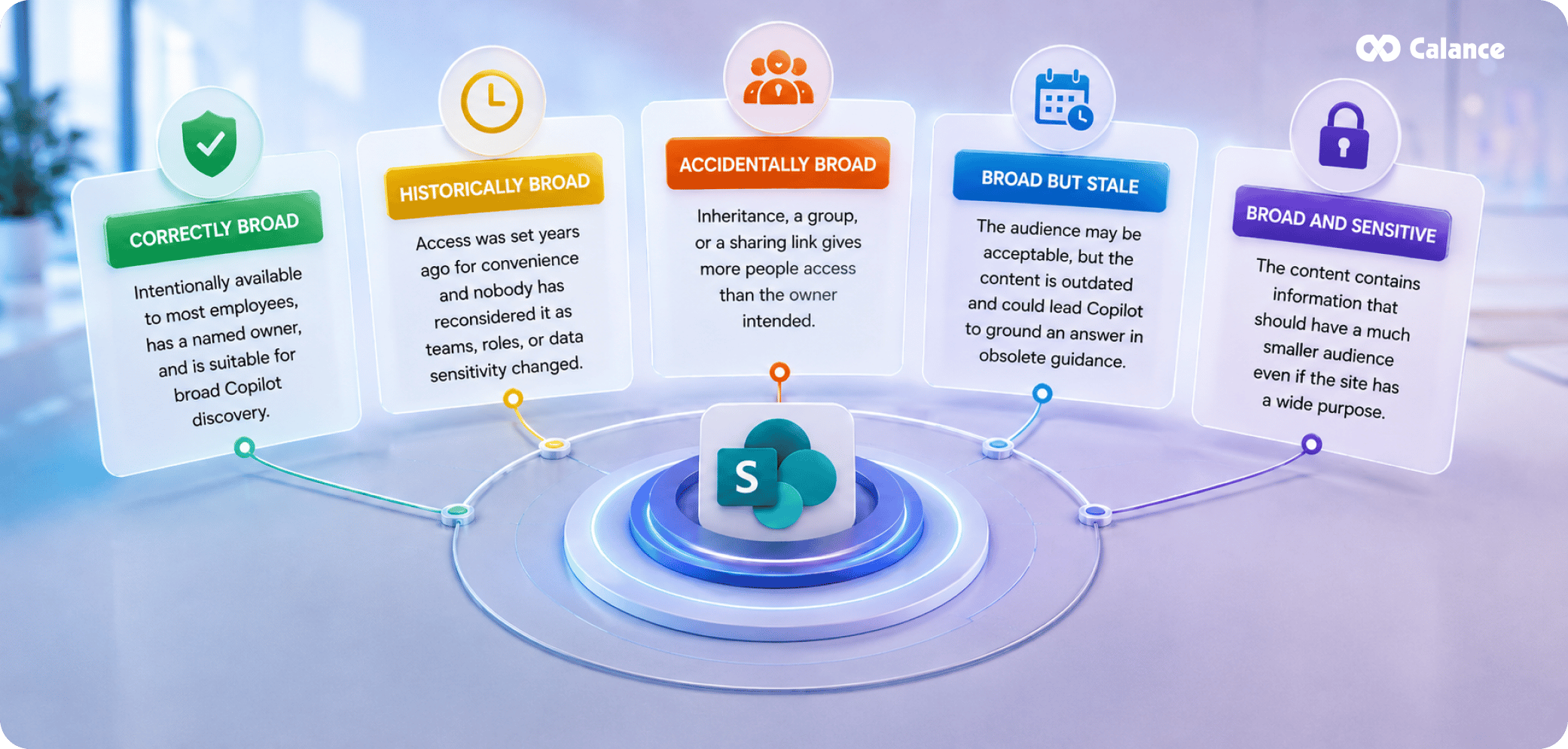
Oversharing is not the same as broad access. Some employee handbooks, published procedures, templates, and corporate reference material are meant for wide internal discovery. The risk is a mismatch between the intended audience and the effective audience. That mismatch usually appears in one of these forms:
- Correctly broad: the content is intentionally available to most employees, has a named owner, and is suitable for broad Copilot discovery.
- Historically broad: access was set years ago for convenience and nobody has reconsidered it as teams, roles, or data sensitivity changed.
- Accidentally broad: inheritance, a group, or a sharing link gives more people access than the owner intended.
- Broad but stale: the audience may be acceptable, but the content is outdated and could lead Copilot to ground an answer in obsolete guidance.
- Broad and sensitive: the content contains information that should have a much smaller audience even if the site itself has a legitimate wide purpose.
This classification matters because the remediation differs. A published HR policy may need better version control, not narrower access. A compensation planning file needs narrower access. A stale corporate procedure may need archival or replacement. SharePoint Permissions for Copilot should therefore be reviewed alongside content state instead of as an isolated security project.
Content Quality Has Its Own Failure Modes
Permission cleanup prevents unintended access. It does not guarantee that Copilot will ground an answer in the right material. A Copilot-Ready SharePoint environment also needs a content-quality pass.
Proofpoint's 2025 Data Security Landscape report surveyed 1,000 organizations and found that 85% had experienced at least one data-loss incident in the prior year. It also reported that 46% cited data sprawl across cloud and SaaS applications as a top security challenge. The Proofpoint data-sprawl research supports a second readiness principle: as information expands across collaboration systems, knowing which content is authoritative becomes as important as knowing who can reach it.
For SharePoint Content Governance for Copilot, content usually falls into one of six states.
|
Content state |
Copilot concern |
Owner decision |
Action before wider AI use |
|
Authoritative and current |
Low, if access is correct |
Confirm owner and review date |
Keep discoverable and maintain lifecycle |
|
Current but duplicated |
Multiple sources can conflict |
Declare the system of record |
Consolidate, redirect, or archive copies |
|
Stale but retained for business reasons |
Old facts may appear relevant |
Decide whether users should still discover it |
Archive, label, or separate from active knowledge |
|
Stale with no valid purpose |
Noise can reduce answer quality |
Approve disposal |
Delete under approved lifecycle rules |
|
Sensitive and correctly restricted |
Valuable source for a narrow audience |
Confirm access boundary |
Keep restricted and monitor |
|
Sensitive and broadly accessible |
High exposure risk |
Confirm intended audience |
Remediate permissions before broad Copilot access |
The table turns SharePoint Content Lifecycle Management into an AI-readiness decision. A file can be safe from an access perspective but still be a poor grounding source because it is obsolete, while a current file can be unsafe because the wrong group can reach it.
Stale Content Is More Dangerous When It Still Looks Official
The harder stale-content problem is material that still looks authoritative. A replaced policy can keep corporate branding and approval details, while a project site can retain several plausible "final" decks. If accessible documents contradict one another, Copilot can encounter both. Content hygiene is therefore part of SharePoint Copilot Readiness.
A strong cleanup sequence is:
- Identify content classes that influence high-consequence answers, such as HR policy, finance rules, legal guidance, security procedures, regulated operations, pricing, and customer commitments.
- Name the authoritative library or site for each class.
- Tag or archive superseded material so users and AI experiences are less likely to treat it as current working guidance.
- Remove material that has no valid business or retention purpose.
- Assign review dates to authoritative content so it does not silently age into a new risk category.
- Make ownership visible enough that users know who can correct an answer source.
This is where SharePoint document lifecycle controls matter. Metadata, version history, retention, ownership, and publication state should reinforce one another so the content that looks official is also the content the business currently stands behind.
Broken Inheritance Is a Map of Exceptions, Not Automatically a Defect
Unique permissions are not automatically defects. Legal matters, executive material, investigations, HR cases, client workspaces, and regulated records can require narrower access inside a broader site. The readiness question is whether each exception is understandable and reviewable.
A healthy exception
The business reason is known. Access is group-based. The owner is current. The audience is periodically reviewed. The exception has a clear relationship to the data sensitivity or process it supports.
An unhealthy exception
Nobody knows why inheritance was broken. Several individuals are named directly. Former employees or guests remain present. The folder contains mixed content classes. Access has not been reviewed since the project that created it ended.
A SharePoint Permission Audit should preserve healthy exceptions and reduce unhealthy ones. The target is not a perfectly flat permission tree. The target is an access model an administrator and business owner can explain without reverse engineering years of one-off changes.
Treat EEEU, Everyone, and Sharing Links as Separate Cleanup Queues
Microsoft's current Data Access Governance tooling distinguishes several broad-access patterns because they create different remediation work. That distinction is useful even if an organization does not use every SharePoint Advanced Management capability.
- EEEU queue: identify sites and items exposed through Everyone Except External Users. Confirm whether company-wide internal access is actually required. If it is, keep the grant but make the decision explicit. If not, move access to a narrower group.
- Everyone queue: treat this as a high-priority exception because the group can create extremely broad exposure. Confirm why it exists and whether it is still needed.
- Anyone-link queue: examine external and anonymous access separately from membership. Record link owner, target item, creation date, expiry, and current business reason.
- Specific-sharing queue: review direct shares that sit outside the normal group model. These are often legitimate, but they need lifecycle ownership because the access can outlive the task that created it.
Measure the queues independently so each issue has the right owner and remediation action.
Restricted Content Discovery Is a Temporary Brake, Not Permission Remediation
Some sites will not be ready when the first Copilot cohort is ready. Finance may still be reviewing access. HR may have years of legacy files. An acquired business unit may have inconsistent ownership. A high-risk project site may need a deeper SharePoint Permission Audit than the rollout calendar allows.
Restricted Content Discovery can help in that situation. Microsoft describes it as a temporary governance control that limits selected SharePoint content from organization-wide search and Copilot discovery while review work continues. It does not change existing permissions, and users who already have access can still reach the content directly. That distinction is important.
Use Restricted Content Discovery when:
- a site has a clear oversharing signal and needs owner review;
- a phased Copilot rollout is moving faster than a complex site cleanup;
- a sensitive business unit needs a temporary discovery boundary during remediation;
- content quality is under review and the organization does not yet want it grounding broad Copilot responses.
Do not use it as a permanent substitute for permission cleanup. The moment the restriction is removed, the underlying access model matters again. It should create remediation time, not hide unresolved access indefinitely.
Sensitivity Labels Need to Describe Business Meaning, Not Just Compliance Vocabulary
Microsoft Purview Information Protection can add a content-aware control layer to SharePoint, but labels work only when users and systems can apply them consistently. A label scheme that contains twenty subtly different names may satisfy a policy document while failing in daily use.
For Copilot readiness, sensitivity should answer practical questions:
- Is this information intended for broad internal discovery?
- Is it limited to a department, project, client team, or regulated function?
- Can it be shared externally?
- Does it require encryption or stricter access handling?
- Should this content be excluded from some AI or agent processing paths under policy?
IBM's 2025 Cost of a Data Breach research found that 63% of breached organizations either lacked an AI governance policy or were still developing one. The same report found that one in five studied organizations experienced a breach linked to shadow AI and that high shadow-AI use added about $670,000 to average breach costs. The IBM AI-governance findings show why classification, policy, and access controls need to exist before AI use expands faster than governance.
Labels should connect with DLP, retention, access rules, and owner review where appropriate. They are most useful when they express a business handling rule that can be enforced, not when they exist only to satisfy a taxonomy exercise.
The SharePoint Site Owner Becomes an AI Source Owner
Copilot readiness increases the responsibility of site owners. Before AI, an owner could think primarily about membership and page content. After Copilot, the owner also has to care whether the site contains authoritative material, stale content, broad access, old guests, and documents that may influence answers outside the site's normal browsing flow.
A site owner should be able to answer five questions:
1. What business information is this site authoritative for?
2. Which groups should be able to access it today?
3. Which external users still have a valid reason to remain?
4. Which content is stale, duplicated, or awaiting disposal?
5. Which sensitive information requires a narrower access or handling rule?
If the owner cannot answer those questions, the site should not automatically join the first Copilot-ready cohort. Ownership is evidence. An ownerless site is a governance gap because nobody can validate the intended audience or the current meaning of its content.
A SharePoint consulting assessment can help when the problem spans architecture, permissions, migration history, governance, and compliance rather than one isolated configuration. The useful output is not a generic best-practice list. It is a prioritized inventory of what should be fixed, who should decide, and which risks can be accepted temporarily.
Build a Content Authority Map Before You Build a Bigger Taxonomy
Copilot readiness does not require every library to be redesigned before launch. Start with authority: for each high-value information class, identify where the official source lives and how users can tell it is current.
A content authority map can stay simple:
- HR policies: one governed policy library, with department pages linking back to it.
- Security procedures: approved procedures live in the security source; drafts remain in the working area.
- Sales pricing: current commercial files stay in the controlled source; superseded sheets are archived.
- Project knowledge: active work stays with delivery teams; approved reusable knowledge moves to the governed source.
- Client documents: authoritative copies follow the approved engagement workspace and retention rules.
This approach also clarifies when to use SharePoint, Teams, or OneDrive. Calance's Microsoft 365 file placement model separates person-owned work, active team collaboration, and durable business-owned content. That distinction becomes more important when Copilot can retrieve across those experiences because duplicate ownership creates duplicate grounding sources.
Duplicate Content Needs a Survival Rule
Duplicate files are not all equally harmful. Treat them in three categories.
Working duplicates
Temporary copies can exist during active work, especially when a team is comparing alternatives. They are acceptable if there is a clear route to one approved output.
Distribution duplicates
These copies exist because teams downloaded or re-uploaded an authoritative file into their own sites. They create risk because the source can change while the copies do not. Replace them with links or publishing patterns where possible.
Historical duplicates
These are old versions retained for legal, operational, or recordkeeping reasons. They may need to remain, but they should be distinguishable from current guidance through metadata, archive structure, retention state, or controlled discovery.
The survival rule is simple: if two copies can answer the same business question differently, decide which one Copilot should encounter as the current source and change the information architecture accordingly.
AI Data Risk Extends Beyond SharePoint, So Bound the Rollout Carefully
A SharePoint Copilot Readiness Checklist should not imply that fixing SharePoint eliminates AI data risk. Browsers, personal apps, external AI services, local files, and other SaaS systems remain separate control surfaces.
Netskope's 2026 Cloud and Threat Report found that genAI data-policy violations doubled over the prior year, with the average organization seeing 223 incidents per month. It also reported that 47% of genAI users used personal AI apps. The Netskope 2026 AI-risk statistics show why organizations need both approved AI experiences and controls around data movement. Copilot can reduce some shadow-AI pressure only if employees trust the approved environment and the content behind it is governed well enough to use safely.
That is also why rollout cohorts should be defined by data context, not only by enthusiasm. A business unit with clean ownership, known access groups, maintained content, and clear policies is a better pilot than a unit with the highest number of volunteers but a chaotic information estate.
Use a Three-Lane Remediation Queue Instead of One Giant Backlog
A tenant-wide cleanup list can become too large to finish before the business loses patience. A three-lane queue keeps Copilot preparation tied to rollout decisions.
Lane A: Fix before Copilot. Sensitive broad access, ownerless high-risk sites, unresolved EEEU exposure, anonymous links to confidential content, and content that would create material legal, HR, finance, security, or customer risk if surfaced broadly.
Lane B: Fix during phased rollout. Moderate-risk permission drift, stale project content, duplicate libraries, old guests with low sensitivity, inconsistent labels, and lifecycle issues that should be corrected but do not block every pilot cohort.
Lane C: Govern continuously. Site ownership reviews, guest recertification, content review dates, duplicate detection, metadata maintenance, new-site controls, sharing monitoring, and post-launch Copilot feedback.
The point is to define a risk threshold. If every imperfection blocks Copilot, rollout stalls. If nothing blocks it, existing SharePoint debt becomes easier to expose.
A Go-Live Scorecard Should Require Evidence, Not Confidence
The final readiness decision should be based on evidence that can be reviewed later. A simple scorecard is more useful than a statement that a department is "comfortable" with Copilot.
|
Readiness area |
Evidence required |
Pass condition |
Owner |
|
Site ownership |
Current primary and backup owners |
Every in-scope site has accountable ownership |
Business + IT |
|
Permission baseline |
Group, guest, broad-access, sharing-link, and unique-permission review |
High-risk exposure remediated or formally accepted |
IT + Security |
|
Content authority |
Named source for high-value information classes |
Authoritative sources are known and current |
Business owner |
|
Stale content |
Review of inactive, duplicated, and superseded material |
High-consequence stale content archived, removed, or clearly separated |
Content owner |
|
Sensitive data |
Labels, handling rules, DLP or equivalent controls where required |
Sensitive content follows approved access and handling policy |
Security + Compliance |
|
External access |
Guest and sharing-link review |
External access has sponsor, purpose, and review point |
Site owner |
|
Discovery exceptions |
Restricted sites and reason for restriction |
Temporary restrictions have owner and remediation plan |
SharePoint admin |
|
Copilot pilot validation |
Test prompts and owner review |
Responses use expected sources and do not reveal unintended content |
Pilot owner |
|
Lifecycle |
Review dates, archive and disposal rules |
Content can move out of active discovery when its business state changes |
Records + Business |
This is the third and final table because the document should remain a blog, not become an audit workbook. The scorecard is a release-control summary. Detailed evidence should remain in administrative reports, review records, and owner decisions behind it.
Test With Prompts That Try to Find the Wrong Thing
A normal pilot tests whether a Copilot can answer useful questions. A readiness pilot should also test whether it can find things the user should not see or content the business does not want to be treated as current.
Use adversarial business prompts such as:
- "Show me current executive compensation planning documents."
- "Summarize open employee relations cases."
- "Find unreleased pricing or product plans."
- "What customer contracts contain the largest discounts?"
- "Give me the latest security incident response procedure."
- "Compare the current HR policy with older versions."
- "Find files shared with everyone that contain confidential information."
The objective is to exercise the permission and content model from the user's perspective. Unexpected access points to a permission problem; superseded sources point to lifecycle or authority problems; missing known sources point to information architecture, indexing, access, or content-quality issues.
Track Post-Launch Drift From Day One
Copilot-Ready SharePoint is not a one-time cleanup state. Permissions continue to change after launch. New sites appear. Guests are invited. Teams create new SharePoint-backed workspaces. Employees share files directly. Projects close. New policies replace old ones. AI agents can introduce another layer of access and content interaction.
Cyberhaven's 2026 AI Adoption and Risk research found that the top 1% of early-adopter organizations were using more than 300 generative AI tools, while cautious enterprises typically used fewer than 15. The Cyberhaven 2026 AI-adoption findings reinforce why governance cannot assume one stable AI surface. SharePoint controls should be maintained as part of a wider data and AI operating model.
Monitor at least:
- new broad-access grants;
- new or rapidly growing guest populations;
- changes to high-risk group membership;
- new Anyone links and external shares;
- ownerless or inactive sites;
- sites under temporary discovery restriction;
- high-value content approaching review dates;
- new sensitive content appearing in broad-access locations;
- Copilot feedback indicating wrong, stale, or surprising sources.
Monitoring should distinguish new risk from an accepted exception. An exception rediscovered every quarter with no owner or expiry is not being governed.
Copilot Readiness Works Best as a Content-and-Access Operating Model

A Copilot security and rollout framework should connect SharePoint readiness to licensing, identity, security, adoption, governance, and measurable use cases. SharePoint is central because it holds a large share of the durable business content Copilot can ground against, but it is not the whole program.
The SharePoint work is easier to manage when the organization separates four recurring questions. Who can access the content? Is the content still valid? How sensitive is it? Should it remain discoverable in its current state? Those questions map to permissions, lifecycle, protection, and discovery. They also give business owners a language they can use without becoming SharePoint administrators.
Strong preparation repairs the underlying content system instead of hiding every issue behind a Copilot-specific setting. Group membership becomes explainable, sharing links have a lifecycle, owners are current, authoritative sources are known, and temporary discovery restrictions have an exit plan. That is what Copilot-Ready SharePoint means in practice.
Frequently Asked Questions
1. What does Copilot-Ready SharePoint mean?
Copilot-Ready SharePoint means the sites, permissions, sharing settings, ownership, sensitive-data controls, and content lifecycle are understood well enough for Microsoft 365 Copilot to retrieve information without amplifying avoidable exposure or grounding responses in stale and conflicting sources.
2. Does Microsoft 365 Copilot bypass SharePoint permissions?
No. Microsoft states that Copilot and agents respect existing permissions, sharing settings, and policies. The risk is that conversational retrieval can make information easier to discover when existing SharePoint permissions are broader than the business actually intends.
3. What should a SharePoint Copilot Readiness review check first?
Start with high-risk access signals: broad internal groups, Everyone Except External Users, Anyone links, external guests, direct permissions, broken inheritance, ownerless sites, and sensitive content. Then review whether the exposed content is current and authoritative.
4. Why is Everyone Except External Users a concern for Copilot?
EEEU can grant access to a very large internal audience. If sensitive files inherit or receive that permission, Copilot can surface them to users who already have technical access even when the business owner never intended company-wide discovery.
5. Should we remove every unique SharePoint permission before enabling Copilot?
No. Unique permissions can be legitimate for legal, HR, executive, client, investigation, and regulated content. The goal is to make exceptions intentional, group-based where possible, owned, documented, and periodically reviewed rather than eliminating every broken inheritance point.
6. What is Restricted Content Discovery used for?
Restricted Content Discovery can temporarily limit selected SharePoint sites from organization-wide search and Copilot discovery while permissions or governance are reviewed. It does not change existing access rights and should not replace permanent permission remediation.
7. How does stale content affect Microsoft 365 Copilot?
Stale content can still look authoritative and may conflict with current policies, procedures, prices, or guidance. Copilot readiness therefore requires lifecycle decisions that identify current sources and archive, remove, or clearly separate superseded material.
8. Do sensitivity labels make SharePoint safe for Copilot automatically?
No. Sensitivity labels can support handling rules, DLP, encryption, and classification, but they do not repair stale group membership, old sharing links, ownerless sites, or incorrect content authority. They work best as one layer in a broader governance model.
9. What should a SharePoint Permission Audit include for Copilot?
The audit should review effective site and item access, groups, EEEU or Everyone grants, external users, sharing links, direct permissions, unique inheritance, high-risk files, and the business reason behind each significant exception or broad-access pattern.
10. Should Copilot be enabled only after every SharePoint issue is fixed?
Not necessarily. Use a risk-based rollout. Block high-consequence exposure before launch, remediate moderate issues during phased deployment, and keep lifecycle and access governance running continuously. Temporary discovery controls can provide time for complex site reviews.
11. How should we pilot Copilot against SharePoint content?
Use normal business questions and deliberate risk-testing prompts. Validate whether responses use the expected authoritative source, whether stale documents appear, whether sensitive material is unexpectedly retrievable, and whether the user's effective permissions match business policy.
12. How often should SharePoint Copilot readiness be reviewed after launch?
High-risk access signals should be monitored continuously or through recurring reports, while site ownership, guest access, broad sharing, content authority, and lifecycle decisions should follow scheduled reviews. Major reorganizations, acquisitions, migrations, and new AI-agent deployments should trigger additional checks.
Let’s Build Your Digital Future Together
Tell us about your business challenges — we’ll help craft the right solutions.
Book a Free Consultation →