

26 Aug 2026

A SharePoint permission check is a graph problem. A file can inherit access from a site, pick up membership through a Microsoft 365 group, carry a direct grant, sit behind an old sharing link, or remain reachable through a broad internal principle such as Everyone except external users. Microsoft 365 Copilot reads inside that access model. The user asks a natural-language question, Microsoft Graph resolves content the user can reach, and Copilot can bring a buried document into the answer without the user knowing its site, library, folder, or filename.
That changes the practical risk of SharePoint Oversharing. A permission granted 3 years ago may have caused little visible friction because employees rarely found the content. Copilot reduces the search effort. The same access path can now connect a broad audience to salary files, draft acquisition material, legal working documents, customer exports, old project folders, or internal notes through a single question.
The engineering task is to map exposure before broad Copilot use, rank sites by blast radius, repair the access paths that have lost their business reason, and use temporary discovery controls where cleanup needs more time. The aim is a permission model that a site owner can explain and an administrator can test. That is the standard for a SharePoint environment that can support AI retrieval without turning old access drift into a daily discovery problem.
TL;DR
Exposure path: Copilot works from existing Microsoft 365 permissions. Broad groups, stale members, direct grants, old links, broken inheritance, and weak site ownership create the paths that matter most.
Fastest diagnostic: build a tenant-wide permission baseline, then rank high-risk sites by broad internal access, external sharing, sensitivity, owner status, and activity. Site-by-site review should begin after the estate has been triaged.
Containment move: use Restricted Content Discovery selectively while permissions are under review. It limits organization-wide discovery and Copilot surfacing for the selected SharePoint site while the existing access model remains in place.
Fix order: remove obsolete principals and links, repair group membership, restore cleaner inheritance where practical, assign accountable owners, confirm sensitive content controls, and rerun the same reports. Improvement has to be visible in the permission data.
Copilot Compresses the Path Between Permission and Discovery
Microsoft 365 Copilot applies the user's access context when it retrieves SharePoint and OneDrive material. The security boundary still comes from identity, permissions, sharing configuration, information protection, and policy. The user experience changes because retrieval is conversational. A person can ask for the latest pricing exception, a draft reorganization plan, or a customer renewal list and receive a grounded response from content they were already allowed to open.
Microsoft's current Copilot data architecture states that SharePoint and OneDrive access controls influence what Copilot can discover and reference. Search and discovery settings, sharing and membership controls, lifecycle policies, sensitivity labels, and DLP conditions all affect the material that can enter that retrieval path. For a SharePoint Permissions Audit, the useful question is therefore simple: which access rights still have a business reason today?
A broad grant can remain technically valid while being operationally wrong. A site created for a finance transformation program may still include a company-wide audience. A confidential library may inherit visitors from the site because the permission chain stayed unchanged when the content changed. A former project member may still sit inside the Entra group that backs the site. Copilot can make those states visible much faster.
A structured SharePoint consulting and assessment services review is useful when the permission graph spans old sites, Teams-connected workspaces, direct file sharing, external guests, and custom workflows. The output should be an exposure inventory tied to specific permission paths and owners.
SharePoint Oversharing has Several Technical Shapes
The word oversharing is often used as if it means one setting. In practice, the same sensitive file can become too broadly reachable through several independent paths. The first audit should classify the path before anyone changes permissions.
|
Access path |
What creates exposure |
What the audit should prove |
First response |
|
Broad internal group |
Everyone except external users, Everyone, or a large Entra group reaches the site or item |
Whether the audience matches the current business purpose |
Replace broad access with a role or business group where needed |
|
Sharing link |
Company-wide, specific-people, or anonymous links remain active after the task ends |
Link type, creator, age, last use, and intended audience |
Expire, remove, or recreate with a narrower audience |
|
Stale group membership |
Old employees, movers, contractors, or project members remain in a backing group |
Current membership against HR or business ownership records |
Remove stale members and define a review owner |
|
Direct permission |
Users receive one-off access outside the normal group model |
Why the grant exists and whether a group can replace it |
Revoke obsolete grants and reduce individual exceptions |
|
Broken inheritance |
Folders or files carry unique permissions that drift away from the library model |
Where inheritance breaks and who approved the exception |
Restore inheritance or document a controlled exception |
|
External access |
Guests, partner accounts, or external links outlive the engagement |
Sponsor, expiry, current business need, and sensitivity |
Remove or renew access with a dated business owner |
The table matters because remediation depends on the path. A sharing-link cleanup leaves a broad Microsoft 365 group untouched. A site visitor change leaves a direct file grant untouched. A SharePoint Access Review has to trace effective access far enough to find the object that actually grants permission.
Long-Lived Permissions Create the Hardest Review Work
Everyone except external users
EEEU is useful when a site or resource is genuinely intended for the internal workforce. Its risk comes from reuse. A library can change purpose while the audience stays broad. A site owner can upload restricted working material into a location whose membership was designed for general information. Microsoft now provides EEEU-focused reporting because unresolved use of these principals is a direct SharePoint Oversharing signal for Copilot readiness.
Old links that survived the task
Sharing links are easy to create and easy to forget. The owner may remember the file, yet the administrator sees a separate access object with its own audience and lifespan. Company-wide links deserve review when the file contains operational, financial, legal, HR, customer, or engineering content. External links need a sponsor and an end date that still makes sense.
Groups with a longer life than the project
Teams and SharePoint often inherit their audience from Microsoft 365 groups or Entra ID groups. Project closure rarely triggers a perfect access cleanup. Membership can survive reorganizations, vendor changes, and internal transfers. Group-based access remains the cleaner model for administration, but the group itself needs lifecycle ownership.
Unique permissions below the library
Broken inheritance is sometimes necessary. It becomes expensive when dozens of folders and files each carry different grants. Auditors then need to reconstruct effective access item by item, and site owners struggle to explain why an exception exists. SharePoint governance framework for 2026 treats access exceptions, ownership, lifecycle, and review dates as connected controls because permission drift is usually a governance problem before it becomes a Copilot problem.
Build the Tenant Baseline Before Fixing Individual Sites
A manual permissions review usually starts in the wrong place: an administrator opens a familiar site, inspects its groups, makes a few corrections, and moves to the next one. That approach spends effort before the organization knows which sites carry the highest exposure. Start with estate-wide signals and use them to create the work queue.
Varonis examined 1,000 real-world environments and nearly 10 billion cloud resources for its Varonis 2025 exposure research. It reported that 99% of organizations had sensitive data exposed in ways AI could potentially surface, while 90% had exposed sensitive cloud data. The exact numbers will differ inside a Microsoft 365 tenant, yet the scale of the finding supports broad discovery before local cleanup.
1. Inventory active SharePoint and Teams-connected sites with owner, template, business function, sensitivity, last activity, external sharing state, and storage volume.
2. Run Data Access Governance permission-state reporting to identify sites with broad internal reach and other exposure patterns.
3. Pull sharing-link and EEEU activity so the team can see where temporary collaboration mechanisms became standing access paths.
4. Tag sites that contain HR, finance, legal, product, customer, security, research, board, M&A, or regulated material.
5. Rank sites by exposure breadth multiplied by content sensitivity and ownership weakness. A large audience on a public policy site ranks lower than the same audience on payroll working files.
6. Assign the first review batch to named site owners with a due date and an escalation path for unowned sites.
This baseline also helps separate tenant policy problems from site-specific mistakes. If hundreds of sites carry the same risky sharing pattern, the organization needs a policy and provisioning correction. If 12 sites are responsible for most of the exposure, a focused remediation wave may be enough.
A Permission Signal Still Needs a Business Decision
Reports can tell you that access is broad. They cannot decide whether that breadth is justified. The owner has to connect each permission state to the purpose of the site and the work performed there.
|
Finding |
Verify before changing access |
Likely decision |
Failure to avoid |
|
EEEU on employee policy site |
Is the content meant for every employee? |
Keep if workforce-wide access is intentional |
Removing valid readership because the group looks broad |
|
EEEU on payroll work area |
Who needs working-file access? |
Replace with payroll or HR operations group |
Leaving general access because the site is old |
|
Anonymous link to approved brochure |
Is public distribution allowed? |
Keep or move to an approved public channel |
Treating every anonymous link as equal risk |
|
Anonymous link to customer export |
Who created it, why, and is it still used? |
Remove and investigate the sharing path |
Recreating the same access with another loose link |
|
Unique permissions on legal folder |
Is case separation a documented requirement? |
Keep controlled exception with owner and review date |
Restoring inheritance without checking legal need |
|
Former vendor in project group |
Is the engagement active? |
Remove if sponsorship ended |
Leaving access until an annual review |
A clean permission model is explainable. Site owners should be able to state which groups belong, what each group is allowed to do, which exceptions exist, and when those exceptions will be reviewed. SharePoint information architecture and governance is relevant here because permissions remain easier to manage when site purpose, library purpose, ownership, and content structure are already clear.
Find Oversharing at Four Layers

A complete SharePoint Permissions Audit needs four views. Each view catches access paths that the others miss.
Site layer: who can enter the workspace?
Review owners, members, visitors, Microsoft 365 group membership, Entra groups, guest users, site sharing settings, domain restrictions, and site-level policies. Pay special attention to sites created for temporary programs that later became repositories for durable business content.
Library and item layer: where did inheritance split?
Inspect libraries with unique permissions, sensitive folders, direct file grants, and content whose audience differs from the rest of the site. High counts of unique permission scopes make later access review harder. The business may be better served by a separate library or site with a clearer audience.
Link layer: which access objects are still alive?
Review link type, scope, creation date, creator, expiration, external recipients, and recent activity. Link cleanup should follow the content's current ownership. When a working document moves into an approved repository, remove its earlier temporary links from the old location.
Identity layer: who still belongs to the audience?
The same SharePoint group can be correctly configured while its membership is wrong. Movers, leavers, contractors, vendors, test accounts, service accounts, and inherited nested groups all need context. Proofpoint's 2025 data-security findings reported that 85% of surveyed organizations experienced at least one data-loss incident in the prior year and that 46% cited cloud and SaaS data sprawl as a top challenge. Access review has to cover people and data location together.
The four-layer model also shows why a single 'permissions clean' label is weak evidence. A site can have neat SharePoint groups and still expose content through a link. A library can inherit correctly and still include a group with stale membership. Effective access is the combined result.
Fix Broad Access Without Breaking the Work People Actually Do
Remediation should preserve the business path while narrowing the permission path. Bulk removal creates support incidents when administrators lack a clear view of the work supported by that access.
- Replace broad principals with role groups. Use payroll, finance operations, legal case team, regional sales, project delivery, or another managed group whose membership has a clear owner.
- Retire old links at the source. Remove links whose business purpose ended. Recreate access with the narrowest approved audience when collaboration still exists.
- Reduce direct user grants. Move recurring access into groups so joiners, movers, and leavers can be handled through managed membership with fewer item-level exceptions.
- Repair inheritance where the exception lost its reason. Keep documented unique scopes where confidentiality or workflow requires them. Remove accidental complexity.
- Split content when audiences are genuinely different. A restricted library or separate site can be easier to govern than a general site with hundreds of item-level exceptions.
- Give external access an expiry and sponsor. Partner collaboration should have a business owner who can confirm whether access still belongs.
The underlying Microsoft 365 relationships matter during cleanup. Teams membership, SharePoint membership, OneDrive sharing, Outlook collaboration, Entra groups, and Power Automate flows can all touch the same information. SharePoint and Microsoft 365 integration work is relevant when access changes need testing across those connected paths as one Microsoft 365 control flow.
Use Discovery Controls as a Containment Lane
Some estates need more time to repair every high-risk site before Copilot access expands. Microsoft provides temporary controls that can narrow discovery while the underlying work continues. The distinction among Restricted Content Discovery, Restricted SharePoint Search, and Restricted Access Control matters because they solve different problems.
|
Control |
What it changes |
Best use |
What remains to fix |
|
Restricted Content Discovery |
Limits organization-wide discovery and Copilot surfacing for selected SharePoint sites |
Temporary containment for sites under permissions and governance review |
Existing permissions, groups, links, ownership, and content state |
|
Restricted SharePoint Search |
Uses a curated allowed list for organization-wide search and Copilot experiences |
Short-term tenant-level reduction while a wider readiness program runs |
Long-term permission and governance cleanup across the estate |
|
Restricted Access Control |
Restricts site access to specified security groups |
High-control sites where the access boundary itself must be narrowed |
Group membership, exceptions, content lifecycle, and owner review |
Restricted Content Discovery is especially useful as a quarantine lane. Microsoft describes it as a temporary governance control for sites with oversharing risk or sites undergoing permissions review. It changes discoverability across organization-wide search and Copilot scenarios while direct access for already-authorized users continues. The team should record why the site was restricted, who owns remediation, and what evidence is required before the restriction is removed.
Restricted SharePoint Search works at a different scale and is also described by Microsoft as temporary. Restricted Access Control affects the access boundary itself. A mature SharePoint Advanced Management program uses these controls as part of remediation, then returns attention to the permission graph that caused the exposure.
Sensitive Content Changes the Order of Operations
The same permission defect should receive a different priority depending on what the site holds. A company-wide group on a lunch-menu site has a very different consequence from the same group on an executive compensation library. Classification and content knowledge therefore belong in the triage model.
AvePoint's 2026 AI governance research found that 89.5% of surveyed organizations reported a generative-AI-related security breach in 2026. It also found a gap between confidence and observed unauthorized access incidents. That wider AI finding supports a conservative review order for repositories containing high-consequence information.
- Tier 1: immediate review. Payroll, compensation, board, M&A, legal investigations, credentials, security operations, regulated personal data, health information, unreleased financials, source code, and customer exports.
- Tier 2: controlled business review. Contracts, pricing, sales forecasts, product roadmaps, supplier terms, internal audit material, employee relations, and active project financials.
- Tier 3: standard governance review. Department procedures, project collaboration, internal reference material, training content, operational templates, and working documents with a defined audience.
- Tier 4: broad internal content. Published policies, employee communications, approved intranet pages, general templates, and material intentionally meant for a large workforce audience.
Sensitivity labels can help identify high-control material, and unlabeled content should remain in the review queue until its sensitivity is known. Older content, imports, and user-created workspaces often carry incomplete classification. SharePoint document management controls become useful here because ownership, metadata, retention, and document state help the reviewer understand what a library actually contains.
Content Placement can Reduce Future Oversharing
Permission cleanup is easier when content is stored in a workspace whose ownership matches its real life. A temporary project folder can become sensitive after the project ends. A personal OneDrive share can become a departmental dependency. A Teams channel can remain active even after the final deliverable becomes an organizational record. Each transition can leave older permissions behind.
Box surveyed 1,640 IT decision-makers for its Box 2026 enterprise AI research. The report says 83% of respondents were running AI agents and 80% reported AI ROI, while the research frames content and governance as core foundations for higher-maturity AI use. For SharePoint, that makes storage ownership part of the AI control model.
A simple placement rule helps: person-owned drafts belong in OneDrive, active group work belongs in Teams-backed collaboration, and durable business-owned content belongs in a governed SharePoint location. The SharePoint versus Teams versus OneDrive model gives site owners a practical way to decide when content has outgrown its original workspace. Moving content intentionally also creates a clean point to remove old links and stale project access.
Make the Site Owner Prove Access Before Approving It
Central administrators can find patterns, but site owners know why a workspace exists. A good Site Access Review gives the owner enough evidence to make a real decision from a short, risk-ranked set of access findings.
1. State the site's current business purpose in one sentence. If the owner cannot do that, flag the site for lifecycle review before permissions are approved.
2. List the groups and broad principals that grant access, including nested or directory-backed groups where practical.
3. Show active sharing links and guest access with age, sponsor, and recent activity.
4. Identify sensitive libraries, high-value content classes, and any unique permission scopes below the site.
5. Ask the owner to approve, narrow, remove, or investigate each material access path. Unanswered reviews should route to escalation and a named follow-up owner.
6. Record the decision, approver, date, exception reason, and next review date. Evidence turns access review into an operating control.
Site-owner review should be small enough to finish. Give owners the high-risk findings first, then provide drill-down data when they need it. The central team retains responsibility for tenant policy, tooling, and escalation. Business owners retain responsibility for explaining who needs the content.
Run the Cleanup as a 45-Day Control Cycle
A bounded cycle gives SharePoint Oversharing work a clear start, decision point, and close date. The calendar below is a working pattern for a defined site cohort; large or regulated estates can stretch the dates while keeping the sequence.
1. Days 1-7: establish the exposure queue. Run permission-state, EEEU, sharing-link, ownership, sensitivity, and activity reports. Select the first cohort by risk.
2. Days 8-14: contain the highest-risk sites. Apply temporary discovery controls where justified, confirm site owners, and freeze unnecessary new sharing on the sites under active review.
3. Days 15-24: repair access paths. Remove obsolete users, links, and groups; restore cleaner inheritance; narrow broad internal audiences; and document valid exceptions.
4. Days 25-32: test business workflows. Confirm Teams access, approvals, external collaboration, search, Power Automate paths, and other processes that depend on the changed permissions.
5. Days 33-39: rerun the evidence. Compare the permission-state baseline, broad-access counts, external links, unique scopes, and owner coverage against the starting point.
6. Days 40-45: release or retain containment. Remove temporary discovery restrictions from sites that meet the exit criteria. Keep unresolved sites in the queue with a named owner and next review date.
The exit criteria should be specific. 'Reviewed' is weak. A stronger requirement might be: EEEU resolved on Tier 1 libraries, anonymous links cleared from restricted content, current owner coverage, documented external access, and every unique permission scope on high-value folders explained.
Measure Whether Exposure is Actually Shrinking
A cleanup program needs repeatable metrics. Closed-ticket counts can hide access that simply moved to another path. Use the same signals before and after remediation so the organization can prove the permission state changed.
Netskope's 2026 cloud-risk findings reported that the average organization saw 223 incidents per month involving sensitive data sent to generative AI apps and that these incidents doubled over the prior year. That research is broader than Microsoft 365, but it shows why measurable data-control outcomes matter as AI use grows.
- Broad-access rate: high-risk sites with EEEU or equivalent broad principals / high-risk sites reviewed.
- External exposure rate: active external links and guest paths on sensitive sites / sensitive sites reviewed.
- Unique-scope count: folders and items with unique permissions in the remediation cohort, tracked before and after cleanup.
- Owner coverage: active sites with confirmed business and technical owners / active sites in scope.
- Access-review closure: material findings with an approved disposition / material findings assigned.
- Containment aging: sites still under Restricted Content Discovery beyond the target review window.
- Recurrence: remediated sites that return to the same oversharing condition at the next review.
Recurrence is especially useful. A site that repeatedly returns to broad sharing may need a provisioning change, different default sharing policy, stronger owner training, or a redesigned content boundary. The metric points to the control that failed after cleanup.
Copilot Readiness Depends on a Maintained Permission Baseline
The end state is a maintained permission baseline that survives daily collaboration changes. SharePoint permissions change whenever people join, move, leave, create teams, share files, invite guests, copy content, automate workflows, or close projects. Copilot increases the value of maintaining that state because discovery is faster and more contextual.
IBM's 2026 breach-cost research puts the global average breach cost at $4.99 million and reports a 56% increase in AI-driven attacks. Unnecessary SharePoint access expands the amount of information available to a compromised or misused identity, which increases the potential blast radius around AI-enabled work. Permission hygiene is therefore part of the wider data-security posture around AI-enabled work.
A quarterly high-risk access review, lifecycle checks for ownerless sites, recurring sharing-link analysis, and event-driven review after reorganizations or acquisitions can keep the baseline usable. The Copilot readiness and rollout framework connects the same idea to Microsoft 365 AI programs: security, governance, rollout, and measurement need to move together.
The practical test is simple. Pick a sensitive site and ask its owner to explain who can reach it, why they can reach it, how external access is controlled, which exceptions exist, and when that access will be reviewed again. If the answer requires several administrators and a week of reconstruction, the permission model still needs work.
The Cleanup Failures are Predictable
- Fixing only the sites users complain about. Oversharing is often invisible to the people with access. Tenant-wide discovery has to create the queue.
- Removing broad access without checking purpose. Some SharePoint sites are designed for broad readership. The decision needs content context.
- Using discovery restrictions as the permanent design. Restricted Content Discovery and Restricted SharePoint Search buy review time. Long-term safety comes from permission, ownership, content, and policy repair.
- Cleaning SharePoint while ignoring group membership. A well-designed site group can still contain the wrong users. Identity lifecycle belongs in the same review.
- Letting every exception live forever. Unique permissions, guest access, restricted sites, and temporary links need review dates. An exception without an expiry path becomes the next source of drift.
- Measuring activity while exposure stays unchanged. Ticket volume and review counts describe effort. Broad-access rate, external exposure, unique scopes, owner coverage, and recurrence describe the condition of the estate.
Build the Access Model Copilot will Inherit
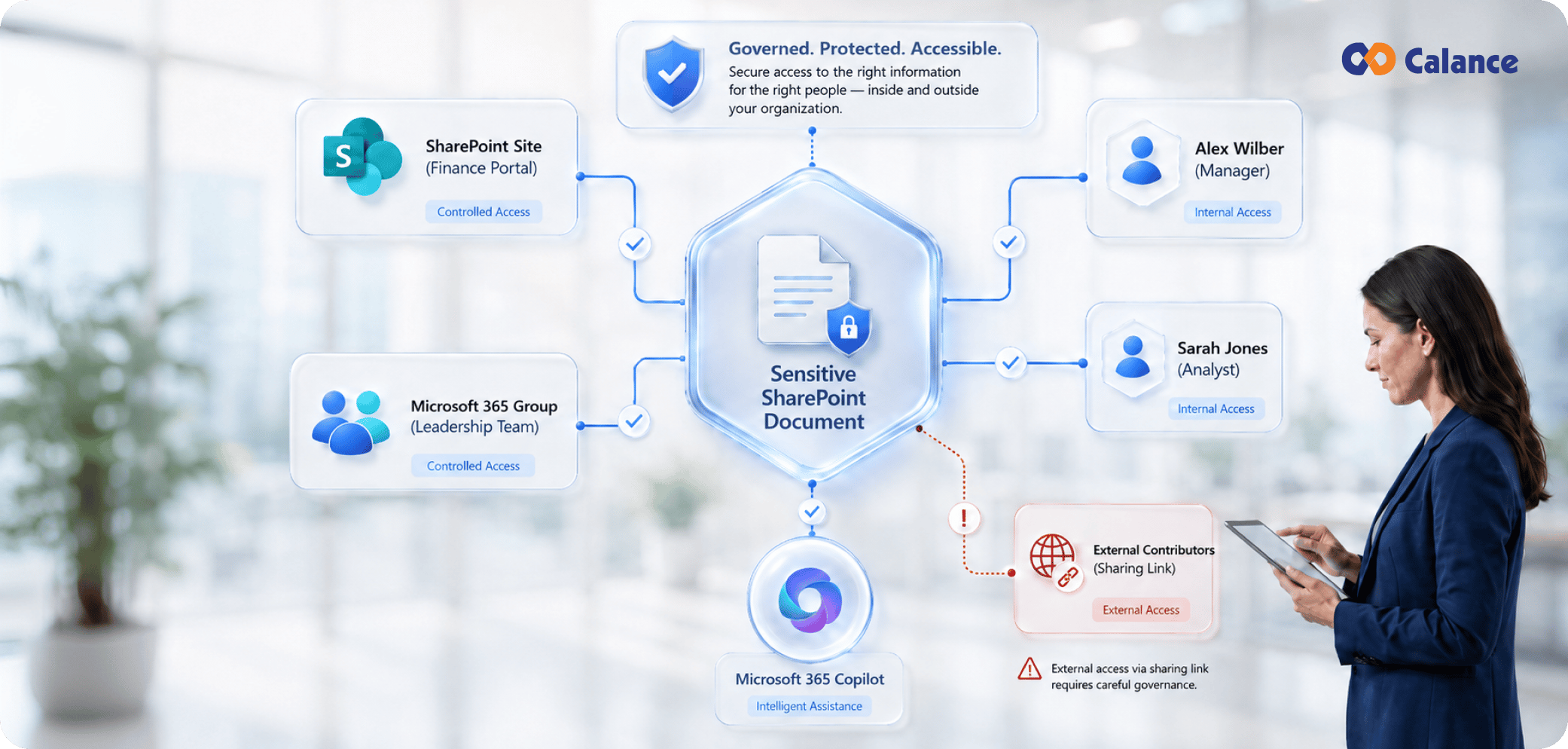
SharePoint Oversharing becomes easier to control when the organization treats access as a living graph of sites, groups, links, identities, and content states. Sites have owners. Groups have members. Libraries inherit or break inheritance. Links create separate paths. External users need sponsors. Content changes sensitivity and ownership over time. The copilot reads inside those relationships.
Start with the estate baseline, rank the sites where broad access meets sensitive content, and give owners evidence they can act on. Repair the permission object that creates the exposure. Use temporary discovery controls for sites that need more time. Then rerun the same reports and keep the review cycle alive after Copilot reaches more users.
A mature SharePoint Copilot Security model rests on access that still matches the business reason for the content, a clear owner for exceptions, and enough reporting to detect when that condition changes.
Frequently Asked Questions
1. What is SharePoint oversharing?
SharePoint oversharing occurs when a site, library, folder, file, or sharing link gives a wider audience access than the current business purpose requires. Common causes include broad groups, stale members, old links, direct grants, and unmanaged permission exceptions.
2. Does Microsoft 365 Copilot change SharePoint permissions?
Copilot uses the access context already available to the user. SharePoint, OneDrive, identity, sharing, and information-protection controls shape what content can be retrieved. The risk rises when existing permissions already expose material to an unnecessarily broad audience.
3. Why can Copilot make old oversharing more visible?
Natural-language retrieval reduces the effort required to find content. A user can receive a grounded answer from an accessible document without knowing the document name or storage location, which makes forgotten access paths more operationally significant.
4. What SharePoint permissions should be reviewed before Copilot rollout?
Review site groups, Microsoft 365 and Entra group membership, Everyone except external users, guest access, sharing links, direct grants, unique permission scopes, broken inheritance, site ownership, and access to libraries containing sensitive or regulated information.
5. What is Everyone except external users in SharePoint?
Everyone except external users is a broad internal principal used to grant access to authenticated people inside the organization. It fits workforce-wide content when that audience is intentional. Sites or libraries containing restricted working material need a narrower audience review.
6. How do Data Access Governance reports help find oversharing?
Data Access Governance reports provide tenant-level permission and sharing signals that help administrators identify sites with broad or sensitive exposure. They can be used to build a review queue before owners inspect the detailed business reason for each permission state.
7. What is Restricted Content Discovery?
Restricted Content Discovery is a SharePoint control that limits organization-wide discovery and Copilot surfacing for selected sites while permissions are being reviewed. Existing users retain their direct access, and the underlying permissions remain part of the remediation work.
8. Is Restricted SharePoint Search a permanent security boundary?
Microsoft positions Restricted SharePoint Search as a temporary measure for narrowing organization-wide search and Copilot experiences during a broader data-governance program. Long-term control comes from permissions, information protection, ownership, and lifecycle management.
9. When should Restricted Access Control be used?
Restricted Access Control fits sites where the access boundary itself needs to be narrowed to approved security groups. It fits high-control repositories. Group membership, sharing exceptions, site ownership, and content lifecycle remain on the ongoing review schedule.
10. Should every broad SharePoint permission be removed?
Broad access can be valid for published policies, intranet content, approved templates, and other workforce-wide resources. The review should compare the audience with the current business purpose and sensitivity of the content before changing permissions.
11. How should external sharing be reviewed before Copilot?
Check guest accounts, external group members, link types, sponsors, creation dates, expiry, recent use, and content sensitivity. Remove access whose business purpose ended and give continuing partner access a current owner, defined scope, and review date.
12. How often should SharePoint access reviews run?
High-risk sites can be reviewed quarterly, with additional reviews after acquisitions, reorganizations, major project closures, sensitive-content changes, or broad Copilot expansion. Lower-risk sites can follow a longer cycle if ownership and permission signals remain stable.
13. What metrics show that oversharing is improving?
Track broad-access rate, external exposure, unique permission scopes, active owner coverage, access-review closure, aging of restricted sites, and recurrence after remediation. Reusing the same measures before and after cleanup shows whether exposure actually changed.
14. What should happen before a restricted site returns to Copilot discovery?
Define exit criteria before containment starts. For a sensitive site, that can include resolved broad principals, reviewed external links, current owners, documented permission exceptions, tested workflows, and a clean rerun of the reports that originally triggered remediation.
Let’s Build Your Digital Future Together
Tell us about your business challenges — we’ll help craft the right solutions.
Book a Free Consultation →