

27 Aug 2026

A SharePoint tenant is a connected control system. A site can inherit membership from a Microsoft 365 group, store files that carry retention requirements, expose content through sharing links, feed Teams and Copilot experiences, and depend on owners who may change roles long before the site closes. Governance has to keep those relationships readable after the original project team has moved on.
The technical problem in 2026 is drift. Sites multiply. Groups keep old members. Owners leave. Libraries collect content with different retention needs. Teams-connected workspaces outlive projects. Broad sharing becomes normal because the first permission decision is rarely revisited. Microsoft has added stronger SharePoint Advanced Management controls for ownership, inactivity, recurring attestation, access reporting, and site restrictions, which means more of the governance model can now run as an operating process instead of a spreadsheet exercise.
A useful SharePoint Governance Framework therefore needs three things working together: policy that can be translated into platform controls, ownership with defined decision rights, and recurring evidence that the estate still matches the rule. The goal is a tenant where administrators can identify drift, site owners can make bounded decisions, and sensitive or abandoned content does not remain indefinitely because nobody knows who should act.
TL;DR
The concern: SharePoint governance usually weakens through ordinary collaboration rather than one large failure. New sites, temporary groups, external sharing, stale owners, copied content, broken inheritance, abandoned Teams, and retention exceptions accumulate slowly. A written policy can describe the right behavior while the tenant moves in another direction. Copilot raises the cost of that drift because accessible content becomes easier to retrieve and reuse.
The overview: SharePoint Advanced Management now gives administrators a stronger control layer for 2026. Site ownership policies can check owner coverage. Inactive site policies can identify sites that have stopped being used. Site attestation policies can ask owners to confirm purpose, membership, permissions, and sharing settings on a schedule. Data Access Governance adds estate-level evidence for broad access, sharing activity, sensitivity, and permission states.
The approach: Build governance as a closed loop. Define policy in testable terms, attach each decision to an owner, run the new controls first in simulation, fix the highest-risk gaps, move suitable policies into active mode, and keep an exception register for cases that cannot follow the default. Measure owner coverage, stale-site volume, attestation completion, broad access, external sharing, lifecycle closure, and repeat violations. Governance is working when the same signals improve over time.
Governance Starts with the Objects that can Drift
SharePoint governance becomes easier to run when the policy names the object it controls. 'Keep SharePoint secure' is too broad to test. 'Every active department site has two current owners' can be checked. 'External access must have a sponsor and review date' can be checked. 'Inactive project sites enter review after a defined period' can be checked.
A tenant assessment should therefore map controls to the objects that create the condition. SharePoint assessment and planning work starts with environment, permissions, content, usage, security, and governance evidence because those signals show where policy has become detached from configuration.
| Governance object | What can drift | Policy question | Evidence to retain |
|---|---|---|---|
| Site | Purpose, privacy, owner status, hub relationship | Why does this site exist and who is accountable? | Owner record, purpose, sensitivity, last review |
| Identity and group | Membership, guests, nested groups, departed users | Who should still be in the audience? | Group owner, member review, sponsor, expiry |
| Content | Authority, age, classification, retention state | Which content belongs here and how long should it remain? | Content class, owner, review date, retention rule |
| Sharing path | Anyone links, company-wide links, direct grants | Which temporary access paths are still justified? | Link type, creator, audience, age, decision |
| Automation and app | Flows, agents, connectors, custom apps | Which process can read or change this content? | App owner, permissions, data path, review date |
| Lifecycle state | Active, dormant, read-only, archived, closed | What state should the site be in now? | Activity signal, attestation, closure decision |
Write Policy so an Administrator can Test It
Policy language should tell an administrator what to look for and what to do when the rule fails. Statements such as 'sites should have owners' leave too much room for interpretation. A production rule needs a threshold, scope, notification path, evidence requirement, and an action for unresolved cases.
For example, a policy for high-control sites might require two accountable owners, prohibit anonymous sharing, require a sensitivity label, set a 6-month owner attestation, and route unresolved ownership failures to a central review queue. A lower-risk employee communication site can use a wider audience and a longer attestation cycle. The policy changes because the business purpose changes.
The structural layer matters here. An information architecture governance guide is useful because policy is easier to enforce when site purpose, libraries, metadata, ownership, permissions, and lifecycle are already defined in a way administrators and business owners can understand.
Treat every policy as a test specification. Name the condition that passes, the evidence that proves it, the person who can approve an exception, and the date the exception must be reviewed again. That turns governance language into something the platform team can operate.
Ownership is the First Control Because Every Other Control Needs a Decision Maker
SharePoint ownership often looks healthy in the admin center because a site has an owner field. The real test is whether the listed person still understands the site, can explain its audience, and has authority to approve changes. A former project lead, inactive contractor, generic admin account, or inherited group can satisfy a technical field while leaving the business decision ownerless.
Business owner: owns the reason for the site
The business owner confirms purpose, intended audience, information sensitivity, acceptable external sharing, and whether the site should continue to exist. This role should be able to answer why a site is needed without reconstructing the original project history.
Technical owner: owns the SharePoint condition
The technical owner handles configuration, policy findings, permission mechanics, lifecycle actions, reporting, and technical remediation. In smaller environments the same person may hold both roles, but the two decision types should still be clear.
Records or compliance owner: owns higher-control content
Some sites contain material whose retention, legal hold, disposition, or classification decisions cannot sit with a site owner alone. Governance should name the escalation path before a site reaches closure.
This is especially important because the external risk picture is already broad. Varonis examined 1,000 real environments and nearly 10 billion cloud resources for its 2025 data exposure research, reporting that 99% of organizations had sensitive data exposed in ways AI could potentially surface. SharePoint ownership gives those exposure findings somewhere accountable to land.
Use the 2026 Lifecycle Policies as Three Different Control Loops
SharePoint Advanced Management now separates three lifecycle questions that organizations used to handle through one generic review process. That separation is useful because ownership failure, inactivity, and governance attestation are different conditions and need different evidence.
| Policy type | Question it answers | Typical signal | Owner action | Possible central action |
|---|---|---|---|---|
| Site ownership policy | Does the site have enough accountable owners or admins? | Owner count or ownerless state | Restore accountable ownership | Notify, report, and for ownerless sites apply configured read-only or archive path |
| Inactive site policy | Is the site still being used? | Activity falls outside the configured period | Certify continued need or prepare closure | Notify, set read-only, then archive when configured |
| Site attestation policy | Does the site still meet governance requirements? | Scheduled review becomes due | Confirm need, ownership, membership, permissions, sharing | Track response and apply configured action after missed reviews |
The safest starting mode is simulation. Run each policy against a representative scope, inspect the report, check false positives, confirm notification recipients, and estimate business impact. A lifecycle rule that identifies 4,000 sites can be technically correct and still be poorly scoped if the owners cannot act on the queue.
Active mode should follow only after the team knows what a failed condition means. Microsoft documents monthly execution for active lifecycle policies, with reports, notifications, and configured actions. Site ownership policy is deliberately gentler for sites that still have an active owner; hard actions such as read-only or archive apply to ownerless sites because that is where accountability has collapsed.
Governance Needs a Lifecycle Route, Not a Permanent Active State
Many SharePoint estates have only two practical states: active and forgotten. A stronger model gives a site a route from request through closure, with evidence captured at each transition.
- Request. Record the business purpose, owner, site type, expected audience, sensitivity, external-sharing need, expected lifespan, and whether the workspace is Teams-connected.
- Provision. Apply the approved template, naming rule, baseline permissions, sharing defaults, ownership minimum, sensitivity settings, and required metadata or library standards.
- Operate. Let owners manage normal membership and content while central reporting watches broad access, sharing activity, inactive ownership, and policy exceptions.
- Review. Run ownership, inactivity, attestation, permission, retention, and business-purpose checks at the cadence assigned to that site class.
- Transition. When a project closes or a department changes, decide which content remains working material, which becomes a durable business source, and which can be disposed of under policy.
- Close or archive. Remove temporary access, preserve required records, archive or delete the site according to policy, and retain the decision record so the tenant does not accumulate unresolved history.
Document rules become especially important in the transition stage. SharePoint document lifecycle controls connect metadata, version history, retention, ownership, and disposal because a site cannot be closed safely if the team has never separated working files from records or durable reference content.
Site Attestation Turns Ownership into Recurring Evidence
A site owner can be correct on the day a site is created and wrong 18 months later. Teams change. Vendors leave. Confidential content arrives. The site's audience expands. Attestation gives governance a formal point where the owner has to re-confirm the site's condition.
- Confirm the site is still required for a current business purpose.
- Confirm the listed owners and administrators are still accountable.
- Review membership and broad groups that can reach the site.
- Review external users, guest sponsors, sharing links, and exceptions.
- Confirm the site privacy and sensitivity still match the content now stored there.
- Confirm retention, records, and closure requirements are known.
- Record the attestation decision and next review date.
Microsoft's 2026 site attestation policy can run on 3-, 6-, or 12-month cycles. After repeated missed reviews, administrators can configure read-only access or an archive path. That makes non-response visible. It also prevents the common pattern where an owner ignores an annual spreadsheet request and the site simply remains active for another year.
Proofpoint's 2025 data-security survey findings give the content side of the same problem. Its research across 1,000 organizations reported that 85% experienced at least one data-loss incident in the prior year, 46% cited cloud and SaaS data sprawl as a top challenge, and 27% of cloud storage in its platform data was abandoned. Attestation should therefore ask about the site and the content living inside it.
Data Access Governance Gives Policy a Tenant-Wide Evidence Layer
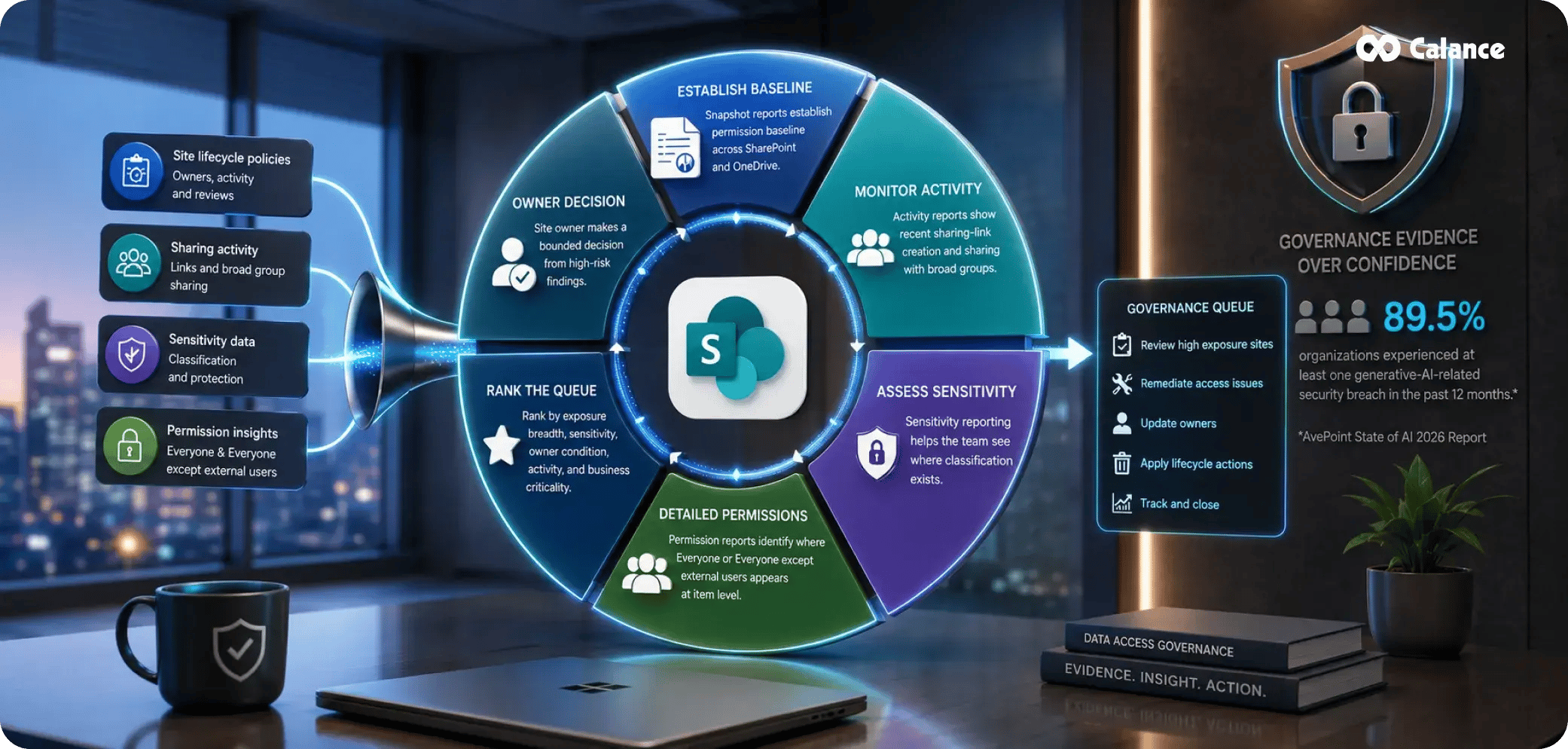
Site lifecycle policies answer whether a site has owners, is active, and has been reviewed. Data Access Governance answers a different question: how broadly can people reach the content? The two control families should feed the same governance queue.
Snapshot reports can establish a permission baseline across SharePoint and OneDrive. Activity reports can show recent sharing-link creation and sharing with broad internal groups. Sensitivity reporting helps the team see where classification exists. More detailed permission reports can identify where Everyone or Everyone except external users appears at item level.
Run the estate-level baseline before asking owners to review individual sites. Central administrators should rank the queue by exposure breadth, content sensitivity, owner condition, activity, and business criticality. The site owner can then make a bounded decision from the high-risk findings rather than inspect every permission object from scratch.
AvePoint's 2026 AI governance findings surveyed 750 global IT leaders and reported that 89.5% of organizations had experienced at least one generative-AI-related security breach in the prior 12 months. The report also found a large gap between confidence in preventing unauthorized access and actual incidents. Governance evidence needs to test the environment instead of relying on confidence.
Exceptions Need their Own Lifecycle
A useful governance framework accepts that some sites need different rules. Legal matters can require unique access. A merger workspace can need a narrow audience and short review cycle. A public-facing content library can legitimately use broad read access. The control problem begins when the exception has no owner, no reason, and no end date.
| Exception | Evidence required | Approver | Expiry or review trigger | Closure test |
|---|---|---|---|---|
| Broad internal access | Documented workforce-wide purpose and content review | Business owner + security where sensitive | At content-purpose change or scheduled review | Audience still matches purpose |
| External guest access | Named sponsor, partner need, domain, expected end date | Business owner | Engagement end or periodic access review | Guest still required and sponsor active |
| Unique folder permissions | Reason inheritance cannot be used | Site owner + technical owner | Workflow change or scheduled review | Exception still needed and understandable |
| Retention exception | Legal or records authority and scope | Records or legal owner | Matter close, hold release, or policy date | Disposition rule can resume |
| Inactive site retained | Business, legal, historical, or migration reason | Business owner + platform owner | Defined future date | Site can move to archive, closure, or active state |
| Policy exclusion | Reason the standard policy should not apply | Governance owner | Next policy review | Default rule can now apply |
Keep the register small enough to use. Every exception should record the affected object, business reason, approver, date, control that is being bypassed, compensating check, and next review. An exception with no next date is simply a new default that has not been admitted yet.
Govern the Microsoft 365 Path Around SharePoint
SharePoint policy cannot stop at the SharePoint interface. Team channel files sit in SharePoint. Users can sync libraries through OneDrive. Outlook and Teams can distribute cloud links. Power Automate can move, copy, approve, or update content. Purview can preserve content after users think it is gone. Copilot can retrieve accessible material without the user browsing to the library first.
That makes SharePoint and Microsoft 365 connections part of governance design. The rule should follow the content and access path across the suite. If a Team is closed, governance still has to decide what happens to the connected site, guest members, final deliverables, flows, records, and links that remain.
Box's 2026 enterprise AI research surveyed 1,640 IT decision-makers. It found that 96% said AI agents need access to company-specific content, while only 36% had connected agents to trusted internal content across many use cases. The same research reports a jump in established or advanced governance frameworks from 24% to 73%. Content governance has become part of AI operations because AI depends on the same enterprise repositories.
Content Placement is a Governance Decision Before it Becomes a Cleanup Project
A governance rule should explain when content belongs in OneDrive, Teams-backed collaboration, or a durable SharePoint site. Otherwise a project can finish while the only approved deliverable remains buried in an inactive Team, or a department can depend on files owned by one person's OneDrive account.
- Person-owned drafts stay in OneDrive while one employee is still the primary owner.
- Active group work can stay in Teams while the working group and conversation remain central to the content.
- Durable business-owned material moves into the governed SharePoint location that will outlast the person or project.
- Authoritative policies, templates, reference sets, and records need a known source location rather than copies across many Teams.
- Project closure should include a content decision, access cleanup, and a lifecycle state for the connected SharePoint site.
The SharePoint content placement model provides a practical way to make those choices through ownership, collaboration state, discovery scope, lifecycle, and governance need. Placement rules reduce the number of exceptions the platform team later has to unwind.
Flexera's 2026 ITAM visibility findings show why central visibility matters in a wider technology estate. Only 36% of respondents reported complete visibility into IT assets and their business impact, while 31% reported visibility into AI software. SharePoint governance benefits from the same discipline: maintain an inventory that connects technical objects to accountable business use.
Advanced Management should Create a Queue, not a Second Admin Universe
SharePoint Advanced Management can produce ownership findings, inactive-site findings, attestation status, access reports, sharing activity, and site restrictions. The value comes from routing those signals into one operating queue rather than asking different administrators to maintain separate lists.
Use one governance record per site. It can hold the site class, owners, policy scopes, sensitivity, last activity, last attestation, access findings, active exceptions, lifecycle state, and next review. The record does not need every technical detail. Detailed reports can remain behind it. The central record should show what requires a decision.
Prioritize by consequence. A payroll site with no active owner and broad access belongs ahead of an inactive communications sandbox. A site with restricted data and external sharing belongs ahead of an old training site. The queue should reflect the combination of content sensitivity, exposure breadth, ownership weakness, and business activity.
Site Classes Make Policy Easier to Apply at Scale
A single tenant-wide rule rarely fits every SharePoint site. A better SharePoint Site Governance model groups sites by purpose and assigns controls to the class. The number of classes should stay small enough that administrators and owners can remember them.
Published enterprise content
Examples include corporate policies, employee communications, approved templates, and reference material. These sites can have broad readership, but publishing rights, source authority, review dates, and owner continuity matter.
Department and operational work
These sites need stable business ownership, controlled membership, documented external sharing, and a regular content review. Some libraries may carry stronger restrictions than the site as a whole.
Project and temporary collaboration
These sites need a named end condition from the start. The closure process should cover final deliverables, guests, groups, flows, records, and the connected Team.
Restricted and regulated work
These sites need narrow access, stronger review, sensitivity controls, clear records handling, and a faster escalation path when ownership or attestation fails.
Okta's 2025 application adoption data found that the average customer used 101 apps globally in 2024, crossing into three figures for the first time. SharePoint sits inside that larger app estate. Site classes help administrators keep rules stable even when content is reached through many tools and collaboration surfaces.
Copilot Changes the Priority Order for Governance Work
Microsoft 365 Copilot respects the access rights a user already has. The governance concern comes from retrieval speed and reach. A file that was technically accessible but practically buried can enter a response when the user's prompt matches its content. This makes permission quality, source authority, stale content, and site ownership more visible.
An AI-readiness review should therefore pull high-risk SharePoint sites toward the front of the governance queue. Check broad internal access, external guests, old links, stale owners, duplicate authoritative content, sensitivity, and sites that have no active lifecycle decision.
Copilot readiness security guidance connects permission sprawl, labels, data controls, user rollout, and measurement. SharePoint governance should feed that program with a maintained site and access baseline rather than treating Copilot as a separate project.
Use temporary search or discovery restrictions where policy allows and cleanup needs more time, but keep a clear exit condition. A temporary restriction should have an owner, reason, start date, remediation tasks, and evidence required before ordinary discovery resumes.
Measure Whether the Tenant is Becoming Easier to Govern
Governance reporting should describe the condition of the estate, not the amount of administrative activity. A team can close 500 tickets while owner coverage falls and broad sharing grows. Use measures that can be repeated against the same population.
| Measure | Definition | Useful direction | What a bad trend suggests |
|---|---|---|---|
| Owner coverage | Active sites meeting the required owner rule / active sites in scope | Up | Provisioning, HR changes, or owner replacement is failing |
| Attestation completion | Sites attested on time / sites due for attestation | Up | Owners lack context, time, authority, or useful evidence |
| Inactive-site backlog | Inactive sites awaiting a business decision | Down | Closure and archive decisions are being postponed |
| Broad-access rate | High-control sites with broad internal access / high-control sites reviewed | Down | Default sharing or permission habits are too loose |
| External access aging | External access paths beyond the approved review window | Down | Sponsorship and expiry controls are weak |
| Exception aging | Open exceptions past their review date | Down | Governance is creating permanent bypasses |
| Repeat violation rate | Sites returning to the same failed condition after remediation | Down | The root policy or provisioning rule has not changed |
Employee behavior belongs beside the administrative measures for intranets and knowledge sites. SharePoint intranet adoption metrics use return behavior, search success, task completion, content trust, and participation to show whether people can actually use governed content. Governance that protects information while making it harder to find will create workarounds.
Coveo's 2025 employee search research surveyed 4,000 employees at large U.S. and U.K. companies. Respondents reported spending an average of three hours a day searching for information, and 42% of the information they sifted through was irrelevant to their role. SharePoint Governance Best Practices should reduce both exposure and retrieval friction.
Run Governance on a Calendar that Matches the Risk
A policy that runs once a year is too slow for some risks and unnecessary for others. Set review cadence by control type and site class.
- Monthly central review: ownership policy failures, inactive-site queue, attestation non-response, high-risk sharing activity, restricted sites, and overdue exceptions.
- Quarterly high-control review: permission baseline, external access, site owners, sensitivity, retention exceptions, key applications or flows, and recurring violations.
- Semiannual business review: department sites, major knowledge repositories, source authority, owner continuity, site purpose, and content age.
- Annual policy review: site classes, default sharing rules, lifecycle thresholds, archive rules, exception authority, and whether Advanced Management policy scopes still match the tenant.
- Event-driven review: acquisitions, reorganizations, major role changes, project closure, sensitive-data incidents, Copilot expansion, or migration can trigger an out-of-cycle governance check.
The calendar should produce fewer unresolved items over time. If every monthly run finds the same class of problem, the response belongs upstream in provisioning, identity lifecycle, owner replacement, training, or default configuration.
The Governance Failures in 2026 are Usually Operating Failures
- A policy exists, but nobody can prove compliance: Replace broad statements with measurable conditions, reporting sources, and owner decisions. Governance without evidence becomes a yearly discussion about whether the rules are working.
- Every site gets the same control level: Classify sites by purpose and consequence. A published employee handbook and an M&A workspace should not carry the same audience, attestation cadence, or escalation path.
- Ownership is treated as a name field: Require an owner who can make business decisions. Keep a technical owner or administrator path as well. Ownerless sites need a stronger response because nobody can confirm whether access, content, or lifecycle still makes sense.
- Exceptions survive longer than the reason for them: Give every exception a review date and an approver. Track overdue exceptions as a governance metric.
- Advanced Management reports are collected without a work queue: Combine ownership, inactivity, attestation, access, sharing, and sensitivity signals into one risk-ranked site record. Reporting is useful when it changes a decision.
The 2026 Framework should Leave a Smaller, Clearer Tenant

A SharePoint Governance Framework works when policy, ownership, and platform evidence reinforce one another. Site creation begins with a known purpose and owner. Site classes determine default controls. Advanced Management checks whether ownership, activity, attestation, and access remain within the rule. Exceptions carry dates. Closure is a normal lifecycle state rather than an emergency cleanup.
The practical result should be visible in the estate: fewer ownerless sites, a smaller inactive backlog, faster attestation closure, fewer unexplained broad grants, fewer expired guests, clearer content ownership, and fewer sites returning to the same failed condition after remediation.
SharePoint Governance 2026 is therefore an operating discipline. Policy defines the condition. Owners make the business decision. Advanced Management produces the signal. The governance team closes the loop and keeps the evidence. When those pieces run on a repeatable cadence, SharePoint stays understandable even as Teams, Copilot, automation, and everyday sharing continue to change the tenant.
Frequently Asked Questions
1. What is a SharePoint Governance Framework?
A SharePoint Governance Framework defines the policies, owners, controls, review cycles, exceptions, and evidence used to manage sites, permissions, content, sharing, lifecycle, and connected Microsoft 365 services. It turns governance from written guidance into recurring operational decisions.
2. What changed in SharePoint governance for 2026?
SharePoint Advanced Management now gives administrators stronger lifecycle and access controls, including site ownership policies, inactive-site policies, recurring site attestation, Data Access Governance reporting, access-review workflows, and site restriction options that can support Copilot readiness.
3. What is SharePoint Advanced Management?
SharePoint Advanced Management is Microsoft's higher-control administration layer for SharePoint and OneDrive. It adds capabilities for content sprawl, lifecycle policy, access governance, site restrictions, policy comparison, change history, and governance work tied to Microsoft 365 Copilot.
4. How should SharePoint site ownership be defined?
Each governed site should have a business owner who can explain purpose and audience, plus a technical owner or admin path for configuration and remediation. Higher-control content may also require a records, legal, security, or compliance decision owner.
5. What does a SharePoint site ownership policy do?
A site ownership policy checks whether sites meet configured owner or administrator requirements. It can run in simulation or active mode, send notifications, generate reports, and apply stronger actions to ownerless sites when the configured response requires it.
6. What is an inactive SharePoint site policy?
An inactive-site policy identifies sites whose activity falls outside the configured threshold. Owners or administrators can certify continued need. Unresolved sites can follow configured notification, read-only, and archive paths, helping the tenant avoid indefinite inactive-site accumulation.
7. What is SharePoint site attestation?
Site attestation asks designated owners or administrators to periodically confirm that a site is still needed and that ownership, membership, permissions, and sharing remain appropriate. The 2026 policy model can run recurring reviews and track missed responses.
8. How often should SharePoint sites be reviewed?
Review frequency should follow risk. High-control sites may need quarterly access checks and 3- or 6-month attestation. Standard department sites can use longer cycles. Ownership failures, external access, incidents, reorganizations, and project closure should trigger extra reviews.
9. How does Data Access Governance fit into SharePoint governance?
Data Access Governance provides estate-level permission, sharing, sensitivity, and broad-access signals. Administrators can use those reports to rank sites for review, then ask business owners to confirm whether the access pattern still matches the site's purpose and content.
10. Should every SharePoint site use the same governance policy?
A small set of site classes usually works better than one rule for everything. Published enterprise content, department work, temporary projects, and restricted repositories have different ownership, sharing, lifecycle, attestation, and escalation needs.
11. How should SharePoint governance handle exceptions?
Record the object, reason, approver, bypassed control, compensating check, start date, and next review. Exceptions should expire or return for approval. An exception without a review date can become an undocumented permanent rule.
12. How does Microsoft 365 Copilot affect SharePoint governance?
Copilot uses the access rights users already have, which makes permission quality and content authority more important. Governance should review broad access, stale owners, old links, duplicate sources, sensitivity, and lifecycle before expanding Copilot across high-risk sites.
13. What metrics should a SharePoint governance team track?
Useful measures include owner coverage, attestation completion, inactive-site backlog, broad-access rate, aging external access, overdue exceptions, closure volume, and repeat violations. Repeating the same measures shows whether the tenant condition is improving.
14. What should happen when a SharePoint site reaches end of life?
Confirm which content must remain, remove temporary access, preserve records under the correct rule, stop or transfer dependent workflows, close connected collaboration spaces, and archive or delete the site. Keep the decision record and accountable owner.
Let’s Build Your Digital Future Together
Tell us about your business challenges — we’ll help craft the right solutions.
Book a Free Consultation →