

26 Aug 2026
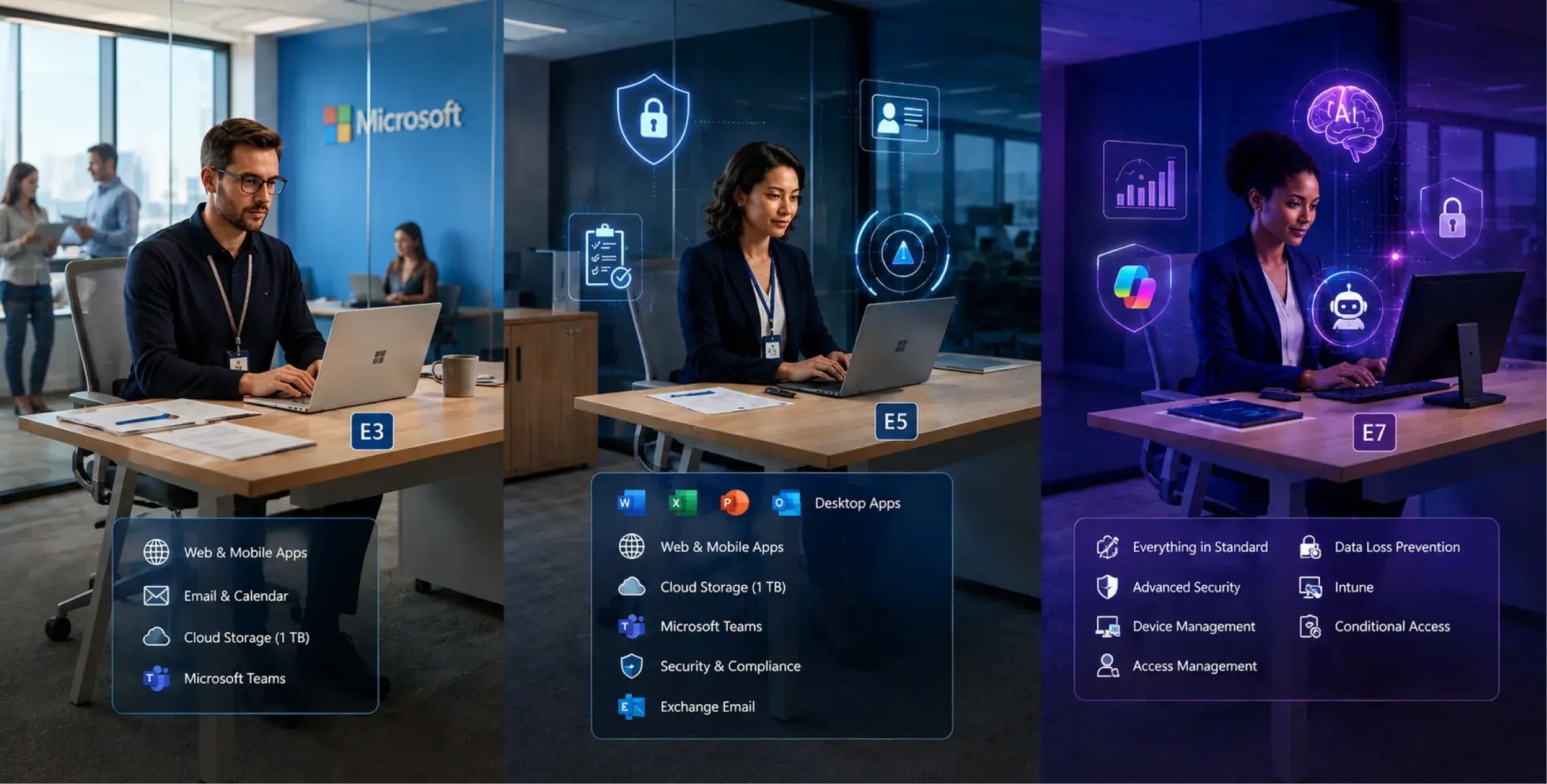
Microsoft 365 enterprise licensing now behaves less like a simple productivity tier and more like an architecture decision. E3, E5, and the new E7 package sit on the same Microsoft 365 foundation, but the control surface changes as you move upward. Identity protection, endpoint and email threat detection, data governance, analytics, Copilot, network access, and AI-agent oversight are not distributed evenly across the three plans. A user can open the same Word document on E3 and E7 while the tenant applies very different controls around sign-in risk, data exposure, threat response, and agent activity.
That is why a Microsoft 365 E3 vs E5 vs E7 decision should begin with technical dependencies rather than job title or budget band. E3 is usually the enterprise baseline for productivity, Windows, device management, and core identity controls. E5 adds the deeper security, compliance, analytics, and voice capabilities that some roles or regulated environments actually need. E7, generally available since May 1, 2026, combines E5 with Microsoft 365 Copilot, Microsoft Entra Suite, and Agent 365. The result is a different operating model, not just another step in a feature ladder.
TL;DR
The concern: enterprises often choose Microsoft 365 Enterprise Plans by hierarchy rather than by technical need. Executives receive E5 because they are senior, security teams receive E5 because it sounds safer, and early AI adopters receive Copilot as an add-on without first checking data governance or identity posture. E7 makes this approach even riskier because it bundles AI, agent control, identity, and E5 security into one commercial unit. A higher plan can remove tool overlap, but it can also create expensive unused rights when the operating model is not ready for them.
The overview: E3 remains the strongest default for users who need enterprise productivity, Windows, Intune, Entra ID P1-level identity controls, and standard data protection. E5 makes sense where the organization can name E5-only requirements such as advanced identity protection, broader Defender coverage, higher-control Purview capabilities, Power BI Pro, or Teams Phone. E7 is aimed at organizations scaling Copilot and agents with a wider identity and governance layer. Microsoft lists E7 at $99 per user per month paid yearly in the U.S. and positions it as E5 plus Microsoft 365 Copilot, Microsoft Entra Suite, and Agent 365.
The approach: start with roles and control requirements, then map each population to the lowest plan that satisfies those requirements. Separate productivity needs from security needs, separate E5-only controls from capabilities already covered elsewhere, and treat E7 as a bundle decision for AI operating maturity. Test whether users will actually use Copilot, whether agents need enterprise governance, whether Entra Suite replaces separate access tooling, and whether mixed licensing gives a cleaner result than a tenant-wide upgrade.
The First Difference Is Not Apps. It Is the Control Boundary
The familiar Microsoft 365 applications do not explain the real separation among E3, E5, and E7. Word, Excel, PowerPoint, Outlook, Teams, OneDrive, and SharePoint are present across the enterprise stack in ways that make the plans look similar from an employee's desk. The differences become clearer when you follow the request path around the user.
This is where a structured Microsoft 365 environment assessment is useful before a licensing change. Calance's Microsoft 365 work covers configuration, license use, security, adoption, migration, and ongoing environment review. For E3, E5, and E7, those areas belong in one assessment because a license choice can change security design, user experience, and recurring cost at the same time.
The 2026 Stack at a Glance
The table below is a decision summary, not a substitute for Microsoft's product terms. Exact entitlements can vary by Teams status, country, agreement, add-ons, and product updates.
| Decision layer | Microsoft 365 E3 | Microsoft 365 E5 | Microsoft 365 E7 |
|---|---|---|---|
| Enterprise productivity | Core enterprise apps and services | E3 foundation | E5 foundation |
| Identity | Entra ID P1-level enterprise controls | Adds E5/P2-level identity capabilities | Adds Microsoft Entra Suite on top of E5 |
| Endpoint, email, cloud-app threat protection | Baseline enterprise security | Broader Defender and XDR capabilities | E5 security plus agent-oriented control stack |
| Data security and compliance | Core Purview capabilities | Advanced data security and compliance | E5 capabilities plus broader AI and agent governance context |
| Analytics | Standard enterprise reporting stack | Adds Power BI Pro | Includes E5 analytics foundation |
| Copilot | Separate Microsoft 365 Copilot license if needed | Separate Microsoft 365 Copilot license if needed | Microsoft 365 Copilot included |
| AI agents | Can use eligible agent experiences with separate licensing where required | Stronger security signals around agent use | Agent 365 included for agent inventory, observability, security, and governance |
| Best starting point | Most enterprise knowledge workers | High-risk, regulated, security, compliance, analytics, or voice populations | AI-at-scale populations that need Copilot, Entra Suite, and Agent 365 together |
Microsoft's 2026 E7 launch announcement states that E7 became available May 1 at a retail price of $99 per user per month and includes Microsoft 365 E5, Microsoft 365 Copilot, Microsoft Entra Suite, and Agent 365. That single fact changes how Microsoft 365 E5 vs E7 should be evaluated. E7 is not simply E5 with one premium security feature. It is a bundle that assumes AI and agent operations have become part of the tenant's normal control model.
Think in Five Control Planes Before You Think in Three SKUs
A better Microsoft 365 License Comparison starts by separating the environment into five control planes. Each plane asks a different question, and the answer may point to a different license population.
Productivity Plane: What work must the user perform?
For many employees, the requirement is still straightforward: desktop and web Office applications, Exchange, Teams, SharePoint, OneDrive, Windows Enterprise, and managed devices. E3 covers a large share of these enterprise needs. If this plane is the only strong requirement, moving the user to E5 or E7 often produces little operational gain.
Identity Plane: How much risk should influence access?
E3 provides a solid identity base for enterprise access. E5 becomes more relevant when risk-based identity protection, privileged access, investigation, and stronger identity signals are part of the security architecture. E7 extends the identity question beyond user accounts by adding Entra Suite, which brings broader identity and network access controls into the bundle.
Threat Plane: What must the security team detect and investigate?
E5 becomes materially different when security operations need deeper Defender coverage across identity, endpoints, email, applications, and cross-domain incidents. Verizon's 2025 DBIR found that compromised credentials were an initial access vector in 22% of reviewed breaches and third-party involvement had doubled to 30%. The 2025 DBIR findings support a practical point: the value of higher-tier security licensing depends on whether the organization has a security operating model that will use the extra signals and response capabilities.
Data and Compliance Plane: What information needs higher control?
Some organizations need only standard retention, sensitivity, and data protection. Others need advanced investigation, insider-risk, eDiscovery, communication compliance, or stronger data-loss controls. This plane often produces a smaller E5 population than the company first expects because high-control needs cluster around legal, compliance, finance, research, executive, HR, and privileged technical roles.
AI and Agent Plane: Is AI a tool, or is it becoming an operating layer?
This is the new 2026 decision. If Copilot is a limited pilot, E3 or E5 with selected Copilot licenses may be enough. If employees are using Copilot broadly and the company is introducing agents that act on systems and data, E7 becomes more credible because Copilot, Entra Suite, Agent 365, and the E5 security foundation are packaged together.
E3 Is the Default When the Requirement Is Enterprise Work, Not Maximum Control
E3 should not be described as the "cheap" plan. In a mature tenant, it is the standard enterprise work tier. It provides the Microsoft 365 productivity stack, Windows Enterprise rights, device management, identity and access controls, and a compliance foundation that covers many ordinary knowledge-worker roles.
A good E3 population usually has a recognizable technical fingerprint:
- Users need full Office desktop applications and enterprise collaboration.
- Devices are managed through Intune or an equivalent enterprise process.
- Conditional Access and standard identity controls are required, but risk-based P2 capabilities are not mandatory for the role.
- The user's data does not require the highest Purview investigation or insider-risk controls.
- Security operations do not need E5-only telemetry for that specific population.
- Power BI Pro, Teams Phone, or other E5 rights are either unnecessary or purchased selectively.
- Copilot, if required, can be added to a defined subset rather than everyone.
The architecture should also account for devices. Calance's Windows 11 modern workplace guidance connects Windows, Microsoft 365, Intune, security baselines, Copilot, and adoption rather than treating the desktop operating system as a separate project. That same view helps with E3 because its value is often tied to how consistently devices, identities, and productivity services are managed together.
E5 Should Be Triggered by Named Risks, Not by Seniority
The easiest way to over-license Microsoft 365 is to assign E5 by organization chart. Senior executives get E5 because they are important. Directors get E5 because they handle sensitive information. IT receives E5 because the team manages the environment. None of those statements prove that the specific user needs an E5 entitlement.
A stronger approach is to require at least one named E5 trigger.
- Identity trigger: the role is subject to higher sign-in risk, privileged access, identity protection, or investigation requirements that depend on E5-level Entra capabilities.
- Threat trigger: the user population must be covered by advanced Defender capabilities because the organization's SOC actively uses those signals for detection, response, and cross-domain investigation.
- Compliance trigger: the role handles information subject to advanced eDiscovery, insider-risk, communication compliance, information protection, or investigation requirements.
- Analytics trigger: Power BI Pro is genuinely required and would otherwise be licensed separately.
- Communications trigger: Teams Phone or related E5 voice rights are part of the approved communications design.
If the organization cannot name one of those triggers, E5 should be questioned. E5 is most defensible when its controls are part of a documented architecture and named operating process.
This is also where Zero Trust cybersecurity planning becomes relevant. Zero Trust depends on identity context, device posture, least privilege, application access, segmentation, and ongoing monitoring. E5 can support several of those controls, but buying the plan does not create the operating discipline by itself.
The E5 Security Case Gets Stronger as Data Risk Gets More Specific

Data protection is one of the places where "everyone should have the highest tier" sounds reasonable until the team maps actual risk.
Proofpoint's 2025 Data Security Landscape research surveyed 1,000 organizations and reported that 85% experienced at least one data-loss incident in the prior year. It also found that 46% cited cloud and SaaS data sprawl as a top security challenge, while only 1% of users accounted for 76% of data-loss events in its platform data. The Proofpoint data-security findings suggest a more targeted licensing principle: risk is rarely distributed evenly across every user.
For Microsoft 365 E3 vs E5, that means the best question is not "Does the company have sensitive data?" Every enterprise does. The question is which users, repositories, workflows, and investigation processes require E5-only controls.
A research scientist, legal investigator, and security administrator can require very different controls from a general business user. The license model should reflect those differences.
E7 Changes the Question From User Security to Human-and-Agent Governance
Microsoft 365 E7 is the first plan in this comparison that assumes AI is part of the organization's steady-state operating model. E5 protects and governs users, devices, applications, and data at a high level. E7 adds the layer needed when AI assistants and agents become regular participants in work.
The package includes four major commercial blocks:
- Microsoft 365 E5 for enterprise productivity, security, compliance, analytics, identity, and device management.
- Microsoft 365 Copilot for AI grounded in work context and embedded into Microsoft 365 applications.
- Microsoft Entra Suite for broader identity, private access, internet access, governance, and identity verification capabilities.
- Microsoft Agent 365 as the control plane for observing, governing, and securing agents.
Agents can carry identities, permissions, data access, owners, and recurring actions. Once they enter production workflows, the tenant needs an inventory of what exists, who owns it, what it can reach, and whether its activity stays within policy.
IBM's 2026 Cost of a Data Breach report reports a global average breach cost of $4.99 million and a 56% increase in AI-driven attacks. The 2026 breach research also calls out the need for identity-based controls for agentic identities. That evidence does not mean every organization needs E7. It means the security model for AI agents has become concrete enough that enterprises scaling agent use should decide how those identities, permissions, and actions will be governed before they multiply.
Use the "Three Yeses" Test Before You Buy E7
E7 becomes easier to justify when all three of these statements are true.
Yes 1: Copilot is becoming a standard work tool for this population
A pilot of 50 licenses inside a 5,000-user company is not an E7 strategy. A business unit where Copilot is used daily across meetings, documents, analysis, research, and communications is much closer. The difference is whether AI is an occasional tool or a normal part of the role.
Yes 2: Agents are moving from experiments into production work
If agents are being created, sponsored, and used across departments, the organization needs ownership, inventory, access policy, lifecycle management, and monitoring. Agent 365 begins to matter when that control problem is real rather than hypothetical.
Yes 3: Entra Suite solves an access problem you already have
E7 includes Entra Suite. If the organization already needs broader identity governance, private access, internet access, or identity verification capabilities, bundling can remove separate licensing and architecture decisions. If Entra Suite has no approved use case, part of the E7 value remains unused.
When only one of these statements is true, E5 plus a targeted add-on is often the cleaner answer. When all three are true for a substantial population, E7 deserves a full commercial comparison.
Bundle Math Matters More Than the $99 Headline
The Microsoft 365 E7 Pricing question should compare the bundle against the components the company would actually buy, not against E3 in isolation.
At current published U.S. list pricing, Microsoft 365 E5 is $60 per user per month after the July 2026 commercial pricing update, Microsoft 365 Copilot is listed at $30 per user per month paid yearly, Agent 365 at $15 per user per month, and Microsoft Entra Suite at $12 per user per month before any special pricing or agreement terms. Microsoft states that E7 is priced below buying its included capabilities separately.
An illustrative comparison is therefore:
  E5 base        $60
+ Copilot        $30
+ Agent 365      $15
+ Entra Suite    $12
= $117 before considering any special E5 pricing for Entra Suite
Against that reference stack, E7 at $99 can simplify the commercial model and reduce list-price exposure for a user who genuinely needs all four components. But the calculation reverses when a user needs only E5, or E5 plus Copilot. The cheapest bundle is still expensive when half of its capabilities have no use case.
Do Not Let AI Excitement Turn E7 Into the New Default
The most expensive mistake in 2026 may be treating E7 the way some organizations treated E5 five years ago: as the "best" license that should therefore go to everyone.
Flexera's 2026 State of ITAM research reports that 59% of organizations saw increased wasted AI software spend, while only 31% reported visibility into AI software and only 29% measured the value of AI software. The 2026 ITAM findings make the licensing risk clear. AI spend can expand faster than the controls used to measure it.
Use an E7 license only when the user population has an operating case for the bundle. A simple internal rule can be:
- E3: enterprise productivity and standard management are the main requirement.
- E5: advanced security, compliance, analytics, identity, or voice controls are required.
- E7: the E5 requirement already exists and Copilot, Entra Suite, and Agent 365 are also part of the approved target state.
A Mixed Estate Is Often the Mature Answer
Many enterprises should expect all three plans to coexist. The licensing estate can mirror the risk and work model rather than forcing one tenant-wide tier.
| Population | Likely starting tier | Reason to move higher | What to verify |
|---|---|---|---|
| General knowledge workers | E3 | E5-only security, compliance, analytics, or voice requirement | Actual capability dependency |
| Security operations and privileged IT | E5 | E7 if Copilot, Entra Suite, and agent governance are also standard | SOC workflows and identity architecture |
| Legal, compliance, investigations | E5 | E7 if AI and agent use becomes part of governed case work | Purview and AI data controls |
| Finance and high-risk data roles | E3 or E5 | Stronger investigation, identity, or data controls | Data classification and control design |
| Broad Copilot-enabled business units | E3/E5 + Copilot initially | E7 when E5, Entra Suite, and Agent 365 needs converge | Adoption and agent operating model |
| AI builders, agent sponsors, automation owners | E5 or E7 | E7 when enterprise agent governance is required | Agent ownership, access, data, and monitoring |
| Executives | E3 or E5 based on risk | E7 only if the bundle matches actual work | Do not license by seniority |
This is where a broader Microsoft cloud licensing assessment can prevent isolated decisions. Microsoft 365 entitlements interact with identity, Azure, endpoint management, security tooling, data platforms, and other subscriptions. A plan that looks more expensive at the SKU level can sometimes replace separate products, while a plan that looks comprehensive can create duplicate spend when another platform already performs the same function.
The Copilot Test Should Measure Work Patterns, Not License Assignment
Copilot is central to the E7 value proposition, but Copilot adoption should be proved before it becomes a bundle assumption.
WalkMe's 2026 State of Digital Adoption study surveyed 3,750 executives and employees across 14 countries. It found that 54% of workers had bypassed AI tools and completed tasks manually at least once in the prior 30 days, 33% had not used AI at all, and only 9% trusted AI for complex business-critical decisions compared with 61% of executives. The 2026 digital adoption study is broader than Microsoft 365, but it is directly relevant to E7 economics: access to AI does not prove that the role will use it well.
Before moving a population to E7, measure four things:
- Frequency: how often do users perform tasks where Copilot can materially reduce effort?
- Depth: are they using only chat and summaries, or are they using Copilot across meetings, documents, analysis, and workflows?
- Data readiness: can users safely retrieve the content Copilot can surface, or does permission and content sprawl need remediation first?
- Outcome: is the organization measuring time saved, cycle-time reduction, quality, support volume, revenue activity, or another business outcome?
Calance's Copilot readiness framework covers prerequisite licensing, security posture, data governance, rollout design, and KPI tracking. That sequence matters more for E7 because Copilot is no longer an optional line beside the suite. It is part of the suite's commercial logic.
E7 Makes SharePoint and Permission Hygiene a Licensing Issue
Copilot and agents work against information the user or agent can access. That turns long-standing SharePoint and Microsoft 365 governance problems into a direct part of the E7 decision.
AI retrieval can make buried information easier to find, while agents can repeat actions at a scale a person would not. That raises the consequence of stale permissions and poorly owned content.
The license discussion should therefore include content governance questions:
- Are high-value sites and libraries assigned to current owners?
- Are broad groups and guest access reviewed?
- Are sensitivity and retention rules applied to the information that matters most?
- Are service accounts, applications, connectors, and agents part of the access inventory?
- Does the organization know which content is authoritative and which is obsolete?
A SharePoint governance framework can provide that operating layer by tying ownership, permissions, lifecycle, records, applications, and exceptions to repeatable controls. E7 does not fix weak information architecture. It makes the cost of leaving it weak harder to ignore.
Use a Downgrade Challenge as Well as an Upgrade Case
Most license reviews ask, "Who needs E5 or E7?" Add a second question: "What would break if this user moved down one tier?"
That challenge forces the team to name the dependency instead of relying on preference.
For an E7 user, ask whether removing E7 would remove a required Copilot, Agent 365, or Entra Suite capability. If yes, document which one and how it is used.
For an E5 user, ask whether moving to E3 would remove an active security, compliance, identity, analytics, or voice requirement. If no owner can identify the dependency, the seat belongs in the review queue.
For an E3 user, the lower-bound question is different. E3 may be required because enterprise desktop applications, Windows rights, endpoint management, archive, compliance, or organizational standards make a lower plan unsuitable.
This downgrade challenge creates evidence on both sides of the decision. It also makes future renewals easier because the organization stores the reason for the tier instead of reconstructing it every year.
A Seven-Gate License Decision Works Better Than a Feature Checklist
A feature checklist tells you what the products contain. A decision gate tells you whether the organization is ready to pay for and operate those capabilities.
- Gate 1: Role fit. What does the user actually do, and which applications, devices, data, and workflows are involved?
- Gate 2: Identity risk. Does the role need standard Conditional Access, advanced identity protection, privileged governance, or broader Entra Suite controls?
- Gate 3: Threat exposure. Is the user inside a security population whose activity must feed advanced Defender detection and response?
- Gate 4: Data obligation. Are there advanced retention, investigation, insider-risk, communication, or data-loss requirements?
- Gate 5: AI use. Is Copilot a recurring part of the role with measured adoption and a defined business outcome?
- Gate 6: Agent use. Does the user sponsor, operate, or depend on agents that need inventory, policy, observability, and governance?
- Gate 7: Bundle economics. Does E7 replace components the organization would otherwise buy separately, or would it simply add unused rights?
E3 normally passes Gates 1 and standard parts of 2 to 4. E5 is justified when Gates 2 to 4 require deeper controls. E7 becomes persuasive when E5 is already justified and Gates 5 to 7 are also positive.
Three Licensing Mistakes to Avoid in 2026
Mistake 1: Treating E7 as "E5 plus Copilot"
That description leaves out Entra Suite and Agent 365, which are central to the bundle. If the organization evaluates only Copilot, it misses both part of the value and part of the operating responsibility.
Mistake 2: Buying E5 security without changing security operations
Advanced Defender, identity, and compliance capabilities produce value when teams configure them, monitor them, investigate alerts, maintain policy, and connect findings to response procedures. A dormant control is still a paid control.
Mistake 3: Using one tier for every knowledge worker
A single tier is easy to administer but can hide large differences in role, risk, data, and AI adoption. A controlled mixed model requires more governance, but it gives finance and IT a clearer reason for every recurring dollar.
Build the 2026 Decision Record Around Evidence
The final license record should be short enough for finance and business owners to understand but detailed enough for security and IT to defend.
| Evidence field | What to record | Why it matters |
|---|---|---|
| User population | Role, department, risk group, device profile | Prevents title-based licensing |
| Current tier | E3, E5, E7, Teams/no-Teams status | Establishes the commercial baseline |
| Named dependency | Security, compliance, analytics, Copilot, Entra Suite, Agent 365, voice | Explains why the tier exists |
| Usage evidence | Relevant product or workload activity | Separates entitlement from adoption |
| Data sensitivity | Normal, restricted, regulated, privileged | Connects controls to information risk |
| Proposed tier | Keep, upgrade, downgrade, investigate | Creates an actionable decision |
| Owner approval | Business, IT, security, compliance as needed | Makes exceptions accountable |
| Review date | Quarterly or before renewal | Stops old decisions becoming permanent |
Review the record after acquisitions, security changes, Copilot expansion, agent deployment, or regulatory change. Microsoft 365 Enterprise Licensing works best as an operating process rather than a once-a-year procurement exercise.
The Choice in 2026 Is About Operating Maturity
Microsoft 365 E3 vs E5 vs E7 is not a simple good-better-best comparison. E3 is a complete enterprise work tier for a large share of employees. E5 adds controls that are meaningful when the organization's security, compliance, identity, analytics, and communications requirements can name them. E7 is a bundle for a newer operating model in which Copilot and agents are becoming normal work surfaces and the company wants identity, security, data governance, and agent control to mature with them.
The cleanest answer will often be a mixed estate. Keep E3 as the standard where it satisfies the work and control model. Assign E5 where advanced security or compliance requirements are real. Use E7 where E5 is already justified and the organization can also prove Copilot adoption, Entra Suite requirements, and agent-governance needs.
That keeps Microsoft 365 E7 Features tied to actual architecture, keeps Microsoft 365 E5 Pricing tied to named controls, and keeps Microsoft 365 E3 Pricing from being treated as a compromise. The right plan is the lowest tier that supports the required operating model without creating a second stack of add-ons, duplicate products, or unmanaged risk.
Frequently Asked Questions
1. What is the main difference between Microsoft 365 E3, E5, and E7?
E3 provides the enterprise productivity and management baseline. E5 adds advanced security, compliance, identity, analytics, and communications capabilities. E7 includes E5 and adds Microsoft 365 Copilot, Microsoft Entra Suite, and Agent 365 for broader AI and agent operations.
2. Is Microsoft 365 E7 available in 2026?
Yes. Microsoft made Microsoft 365 E7 generally available on May 1, 2026. It is offered with and without Teams and is positioned as the company's Frontier Suite for enterprises scaling Copilot and AI agents.
3. What is Microsoft 365 E7 Pricing in the United States?
Microsoft announced a U.S. retail price of $99 per user per month for E7. Agreement pricing, geography, Teams status, purchasing channel, term, taxes, and negotiated commercial terms can change the payable amount.
4. When should a company choose Microsoft 365 E3 instead of E5?
Choose E3 when enterprise productivity, Windows, device management, core identity, and standard security and compliance controls satisfy the role. Move to E5 only when a named E5-only security, compliance, analytics, identity, or voice capability is required.
5. What makes Microsoft 365 E5 different from E3 for security?
E5 extends the security stack with deeper identity protection, Defender capabilities, cross-domain threat detection, and higher-control compliance features. The exact value depends on whether security teams actively configure, monitor, investigate, and respond using those capabilities.
6. Is Microsoft 365 E7 just E5 with Copilot?
No. E7 combines Microsoft 365 E5, Microsoft 365 Copilot, Microsoft Entra Suite, and Agent 365. The Entra and Agent 365 components are important because E7 is designed around broader identity, access, AI, and agent governance.
7. Can a company mix E3, E5, and E7 licenses?
Yes. Mixed licensing is often the most defensible model. General knowledge workers can remain on E3, higher-risk or regulated populations can use E5, and selected AI-heavy populations can use E7 when the full bundle is required.
8. Does E3 support Microsoft 365 Copilot?
Eligible E3 users can use Microsoft 365 Copilot when the appropriate Copilot license is added and prerequisites are met. E7 differs because Microsoft 365 Copilot is included in the E7 bundle.
9. What does Agent 365 add to E7?
Agent 365 provides a control plane for discovering, observing, governing, and securing AI agents. It becomes more relevant as organizations move from isolated agent experiments to production agents that access data or act on business processes.
10. Why does Microsoft Entra Suite matter in an E7 comparison?
Entra Suite expands identity and network access capabilities beyond the E5 identity foundation. It can matter for organizations standardizing stronger private access, internet access, identity governance, and identity verification across users and AI-enabled work.
11. Is E7 cheaper than E5 plus separate AI and identity add-ons?
It can be when the organization genuinely needs E5, Copilot, Agent 365, and Entra Suite for the same user. The comparison should use the company's actual agreement prices and approved requirements rather than assuming every E5 user needs the full E7 bundle.
12. How should enterprises review Microsoft 365 Enterprise Licensing?
Review licenses by population, named capability dependency, usage evidence, data sensitivity, security requirements, AI adoption, and agent use. Recheck the model quarterly and before renewal so old assignments do not become permanent simply because nobody revisited them.
Let’s Build Your Digital Future Together
Tell us about your business challenges — we’ll help craft the right solutions.
Book a Free Consultation →